AI-Native Business Strategy: Why 95% of AI Projects Return Nothing
88% of companies use AI. About 6% profit from it. The gap isn’t the tooling — it’s workflow redesign. Here’s what pays off, what to skip, and the real cost.
Most companies buying AI right now will get nothing back. MIT's 2025 study of 300 enterprise deployments found that 95% of generative AI pilots produced no measurable profit impact — not because the models were bad, but because nobody changed how the work actually flowed. This post is about the difference between the 95% and the 5%: what to build, in what order, and when the whole exercise is a waste of your money.
If you run a business and you're being told to "adopt AI", the useful question is not which tool. It's which workflow are you willing to redesign.
 The gap between the winners and everyone else isn't the software budget — it's whether the team's daily routine changed. (Photo: Unsplash)
The problem, honestly
Here's the pattern that plays out in almost every company.
Leadership buys licences. Everyone gets a chat assistant. For three weeks people paste emails into it and feel clever. Then usage drops, nothing on the P&L moves, and by the next budget cycle "AI" is quietly filed under things we tried.
The numbers back this up. McKinsey's State of AI survey (November 2025, ~2,000 respondents) found 88% of organisations now use AI regularly — but only about 6% attribute more than 5% of their EBIT to it. Adoption is nearly universal. Payoff is rare.
Why? Because most "AI adoption" is digitisation: you took a task a human did and had a machine do the same task, in the same sequence, inside the same broken process. The email still gets written. The lead still waits two days for a proposal. The knowledge still lives in someone's head and four Google Docs.
⚠️ MIT's study also found a "shadow AI economy": only ~40% of companies have official LLM subscriptions, but ~90% of workers already use personal AI tools for job tasks. Your staff have adopted AI. Your company hasn't.
AI-native vs. digitised (in plain English)
Think of a restaurant. Digitisation is giving the waiter a tablet instead of a notepad. Same waiter, same trips to the kitchen, same wait time — slightly fewer typos.
AI-native is realising that if orders land in the kitchen the instant the guest decides, you don't need the trip at all. The role of the waiter changes from carrying information to judging the room.
That's the whole idea. AI-native means you redesign the sequence of work around the fact that drafting, retrieving, summarising, and triaging are now near-free — and then you point your people at the parts machines are bad at: judgement, relationships, and deciding what's worth doing.
McKinsey tested roughly 25 organisational attributes against real EBIT impact. The single strongest predictor was fundamental workflow redesign. And only 21% of adopters had redesigned even one workflow.
That is the entire game, and almost nobody is playing it.
The four pillars that actually move the needle
1. Shift your team from execution to orchestration
Stop measuring people on output volume. A marketer who ships 12 drafts a week is no longer impressive — the machine does that. A marketer who chooses the right 3 and kills the other 9 is.
So what: your job descriptions, your review criteria, and your definition of "a good week" all need rewriting. If you deploy AI assistants but still reward volume, you'll get more mediocre output faster. That's a real risk, not a hypothetical one.
2. Make your data reachable before you make it clever
An AI model with no access to your context is a very confident stranger. It will invent your refund policy.
The fix has a name: RAG (Retrieval-Augmented Generation) — a plain-language way to put it is open-book exam instead of memory test. You keep your documents in a searchable store; when someone asks a question, the system finds the relevant passages first and hands them to the model along with the question.
Getting documents in looks like this:
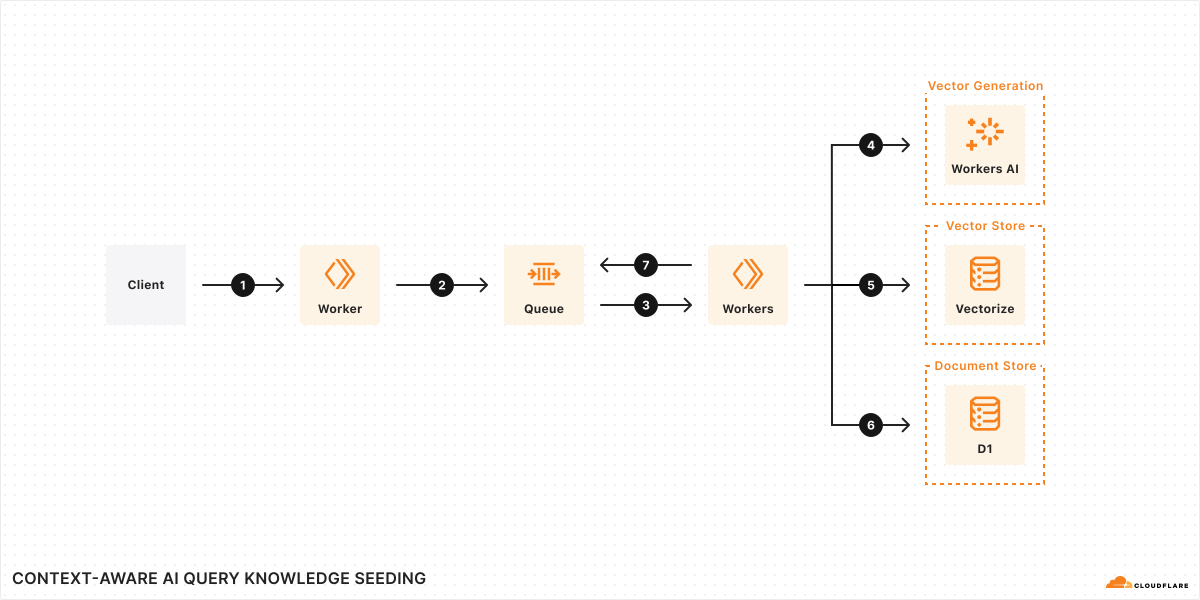 The "seeding" half: your SOPs, price lists and contracts get chopped into pieces and indexed so they can be found by meaning, not just keywords. (Source: Cloudflare Reference Architecture)
And answering a question looks like this:
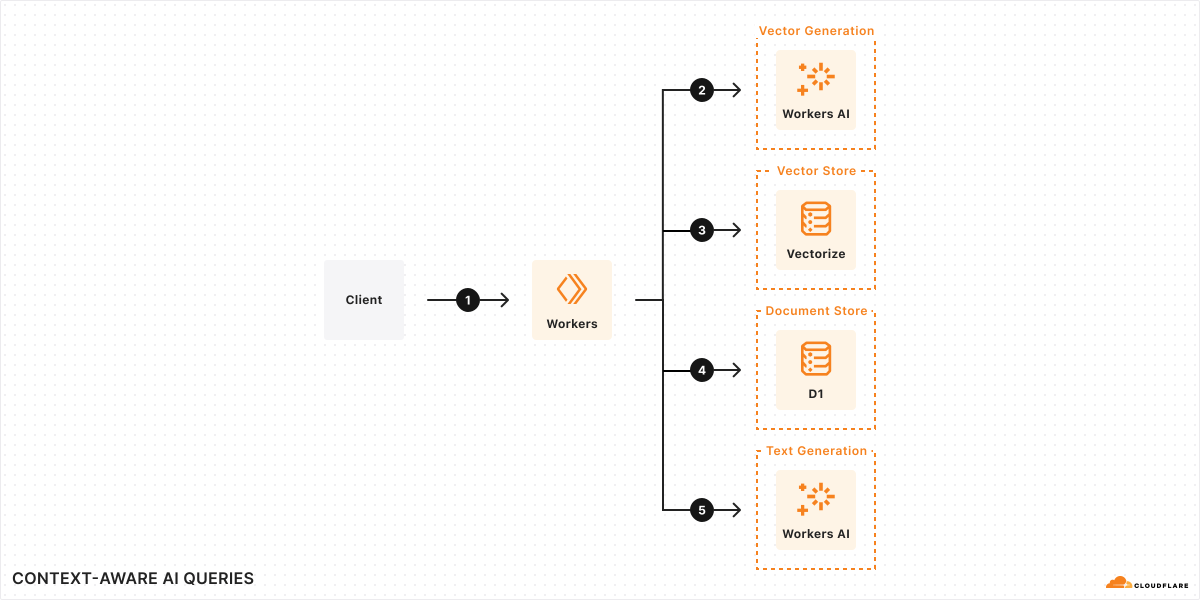 The "query" half: the question pulls the relevant passages, and only then does the model write an answer. This is why a RAG answer can cite a source and a plain chatbot can't. (Source: Cloudflare Reference Architecture)
So what: this is the difference between an assistant that says "typically, refund policies are around 30 days" and one that says "your policy is 14 days, per section 4 of the 2026 terms." One is a liability. The other replaces a support ticket.
3. Automate the touchpoints where speed is the product
Inbound lead qualification, appointment scheduling, order status, document intake. These are places where a 6-hour delay loses the sale and a 6-second reply wins it.
The plumbing here is boring and mature — tools like n8n, Make or Zapier connect your form, your CRM and a model without anyone writing a backend.
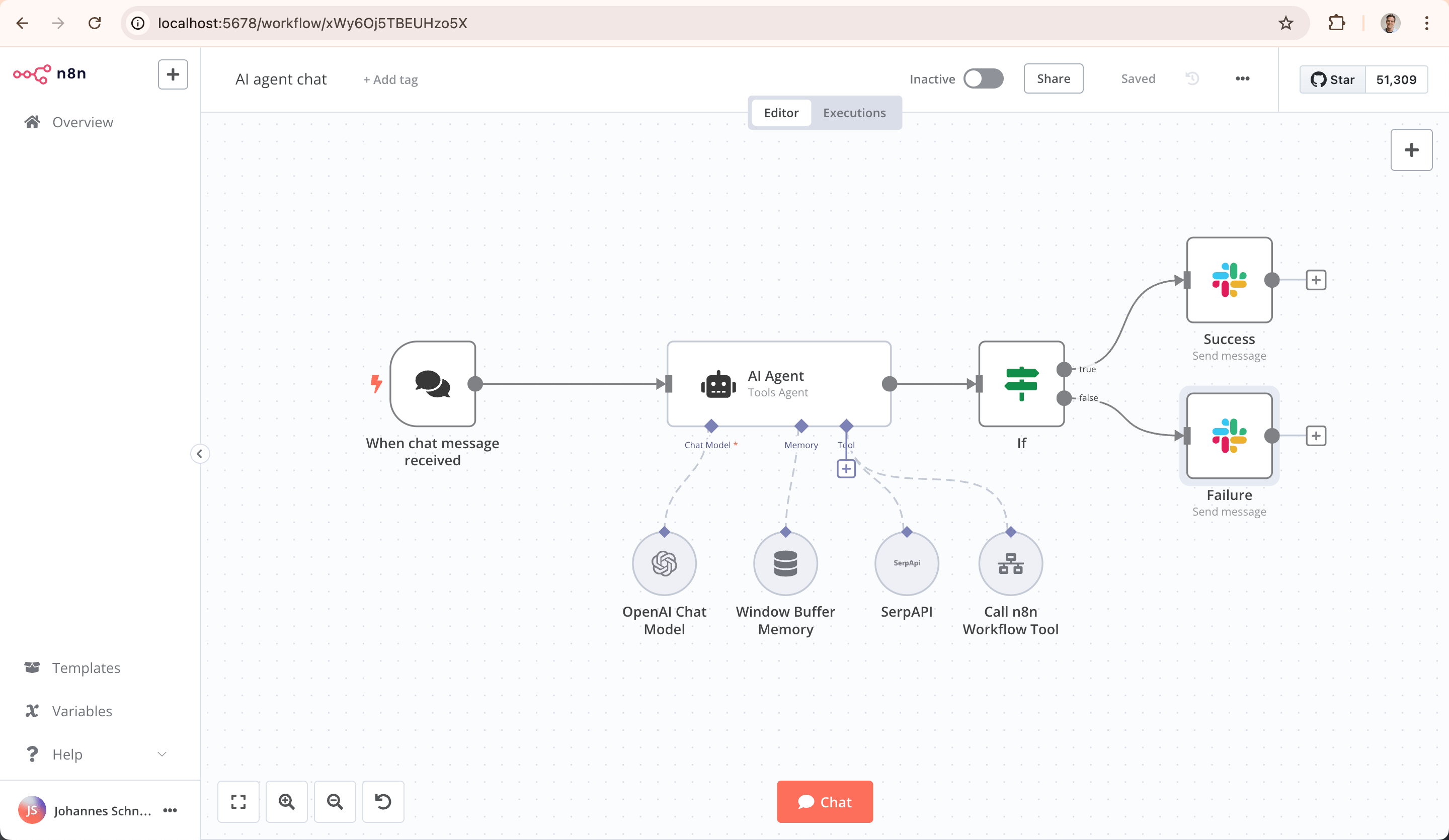 A visual automation canvas: each box is a step (form submitted → enrich → score → draft reply → notify a human). You can see the whole workflow, which matters more than it sounds — it's what makes it auditable when it misbehaves. (Source: n8n on GitHub)
A lead-scoring step is genuinely this small:
{
  "input": "Form submission + enriched company data",
  "instruction": "Score 0-100 on fit with our ICP. Return score, one-line reason, and next_action (auto_reply | route_to_sales | ignore).",
  "route_if": "score > 70 → notify sales in Slack within 60s"
}
That's the shape of the thing — a scoring instruction and a routing rule. Notice what it does not do: it never sends anything to the customer without a rule saying it may. That constraint is the design, not an afterthought.
So what: the win isn't "we saved a person." It's that no qualified lead ever sits in an inbox overnight again.
4. Prototype in days, not quarters
AI coding tools and low-code builders have collapsed the cost of finding out you were wrong. An internal dashboard or a customer portal that used to be a two-month commitment is now a two-day test.
So what: you can stop arguing about which feature to build and just build the cheap version of both. The strategic value is the reduced cost of being wrong, not the reduced cost of engineering.
The roadmap, and what each phase actually costs you
| Phase | Time | What you do | What you have at the end |
|---|---|---|---|
| 1. Audit | Weeks 1–2 | Find the repetitive, high-friction workflows. Rank by volume × pain, not by how AI-ish it sounds. | A shortlist of 3 workflows, with baseline numbers |
| 2. Core tooling | Weeks 3–6 | Give the team proper assistant licences and connect them to real company knowledge | A working internal knowledge base people actually query |
| 3. Workflow automation | Weeks 7–10 | Wire the systems together for the top-ranked workflow only | Automated intake, scoring, routing — with a human checkpoint |
| 4. Product | Ongoing | Embed AI in what you sell, if and only if customers asked | A feature, not a press release |
Real costs, so you can budget honestly:
- Licences: roughly $20–$30 per user per month for business-tier assistants (ChatGPT Business is ~$25/seat monthly; Claude Team starts at $25/seat with a 5-seat minimum; Microsoft 365 Copilot is ~$21/seat but requires a qualifying M365 licence underneath it, so the real cost is often two to three times the sticker).
- The knowledge base: cheap in software, expensive in discipline. Somebody has to actually write down the SOPs.
- Automation: a few hundred dollars a month in tooling, plus one person who owns it when it breaks. It will break.
⚠️ This is where the value evaporates. Phase 2 works whether or not anyone changes their habits, so it feels like success. Phase 3 is the one that touches the P&L, and it's the one companies skip — because it requires someone to say "we no longer do it the old way," and that's a management decision, not a software purchase.
When this is worth doing
- You have a repetitive, high-volume workflow with a measurable cost. Support tickets, lead intake, invoice processing, document review. You can count the hours today, so you can count the savings later.
- Your answers already exist in writing but nobody can find them. That's the cheapest, safest, highest-hit-rate AI project in existence.
- Speed of response is a competitive advantage in your market. Services, real estate, B2B sales, hospitality.
- You have one person willing to own it. Not a committee. One person.
When you should NOT do this
- You have under ~5 people and no repeated process yet. Buy everyone a $20 assistant subscription, skip the roadmap entirely, and revisit in a year. Your bottleneck is demand, not throughput.
- Your data is genuinely a mess and nobody will fix it. Feeding a contradictory, out-of-date knowledge base into a model produces confident wrong answers at scale — strictly worse than the status quo. Better alternative: spend the same two months cleaning and consolidating your documents. That project pays off with or without AI.
- The process is low-volume but high-consequence. Legal filings, medical decisions, final pricing approvals. Better alternative: use AI to prepare the material and keep the decision fully human.
- You're doing it because a competitor announced it. MIT's finding that AI budgets skew heavily to sales and marketing while the better returns sit in operations and finance is exactly this failure mode — spending where it's visible instead of where it pays.
Compared to the alternatives
| AI-native redesign | Buy licences only | Stay as-is | |
|---|---|---|---|
| Upfront effort | High — process change | Low | None |
| Monthly cost | Licences + tooling + an owner | Licences only | $0 |
| Typical result | The 5% with measurable P&L impact | Enthusiasm, then quiet decline | You keep your margin, lose response speed |
| Main risk | Automating a bad process faster | Paying for shelfware | Competitors answer in minutes; you answer tomorrow |
| Honest verdict | Worth it for one workflow at a time | Fine as a starting step, never the finish | Defensible if you're small or your moat isn't speed |
Note that "stay as-is" is a legitimate column. For a lot of small businesses it's the right answer this year.
📺 Building the Enterprise of the Future presented by QuantumBlack, AI by McKinsey — The Montgomery Summit
The verdict
- Adopt if you have one painful, repetitive, countable workflow and one person willing to own its redesign. Do that single workflow end to end before touching a second. The 5% got there by finishing one thing, not by starting ten.
- Skip if you're small, your processes are still forming, or your documentation is a mess nobody will clean. Buy the individual subscriptions, let people use them, and spend your energy on demand instead.
- Do this week, regardless of size: write down your three most-repeated questions from customers and staff, and answer them properly in one document. That's the seed of every useful AI project you'll ever run — and it's worth doing even if you never buy a thing.
FAQ
Do we need this if we're a 10-person company? Probably one piece of it: the knowledge base. Skip the automation layer until you have a process that repeats more than a few times a week.
What's the realistic monthly cost to start? Assistant seats at roughly $20–$30 per person, plus a few hundred for automation tooling once you reach phase 3. The bigger cost is a person's attention, not the invoice.
What breaks if we skip AI entirely for another year? Mostly response speed and cost per transaction. In markets where the fastest quote wins, that's material. In relationship-driven or low-volume businesses, much less so — be honest about which one you are.
Why do so many of these projects fail? Because the tool got installed and the workflow didn't change. Workflow redesign is the strongest predictor of actual profit impact, and only about one in five adopters has done it.
Should we build our own or buy something? Buy, for anything that isn't your core differentiator. MIT found externally built tools succeeded roughly twice as often as internal builds.
What governance do we need before starting? Three rules, written on one page: what data may never be pasted into a third-party tool, who reviews AI output before it reaches a customer, and who owns the system when it misbehaves. That's enough to start.
References
- McKinsey — The state of AI in 2025: Agents, innovation, and transformation
- MIT — The GenAI Divide: State of AI in Business 2025 (coverage)
- Cloudflare Reference Architecture — Retrieval Augmented Generation
- n8n — open-source workflow automation
- Anthropic — Claude pricing
- Microsoft 365 Copilot — pricing
#AIStrategy #BusinessAutomation #RAG #WorkflowRedesign #AIAdoption #SMB #TechStrategy
✍️ The Author: Do Ngoc Hoan Founder of CookConnects.ca & Wizy.ca. Bridging the gap between advanced algorithms and business execution. I write for technical founders looking to scale their impact with AI and robust engineering.