Gemini Spark: Google's 24/7 AI Agent Is Brilliant — Inside Google's Walls
Spark keeps working after you close your laptop — inbox triage, monitoring, invoices. But it only reaches what Google owns, and that wall decides whether it's worth $19.99 to you.
Gemini Spark is Google's always-on AI agent: you describe a goal, close your laptop, and it keeps working on a Google server until the job is done. It's genuinely good at the boring admin that eats your week — inbox triage, recurring monitoring, invoice wrangling. The catch is simple: it only reaches things Google owns. If your work lives in Outlook, Notion, or a codebase, Spark is not your tool.
The problem, honestly
Look at last week. How much of it was actual work, and how much was chasing?
Chasing the one email with the deadline buried in paragraph four. Re-reading a 40-message thread to find out what was decided. Checking, every single month, whether the credit card statement grew a new fee. Copying numbers off six invoices into a spreadsheet.
None of that is hard. That's exactly why it's expensive — it's too easy to delegate to a person, too fiddly to automate with a script, and too frequent to ignore.
The usual AI answer doesn't fix it either. A chatbot only works while you're sitting there, prompting it, watching it. You're still the one holding the whole thing together. You've replaced typing with supervising.
What is Gemini Spark? (in plain English)
Think of a normal AI chat as a conversation. You ask, it answers, the moment ends.
Spark is a coworker with a to-do list. You hand over an outcome — "watch my inbox for anything with a deadline and send me a digest each morning" — and it goes away and does it. On its own schedule. Without you.
Technically: Spark runs on Gemini 3.5 Flash inside an "agentic harness" from Google Antigravity (the harness is the part that lets a model plan multiple steps, use tools, and recover when a step fails). It executes on dedicated virtual machines in Google Cloud — which is the whole reason it can keep going after you shut your laptop.
In the Gemini app it's a toggle. Flip from Chat to Spark, and the chat box becomes a task dashboard.
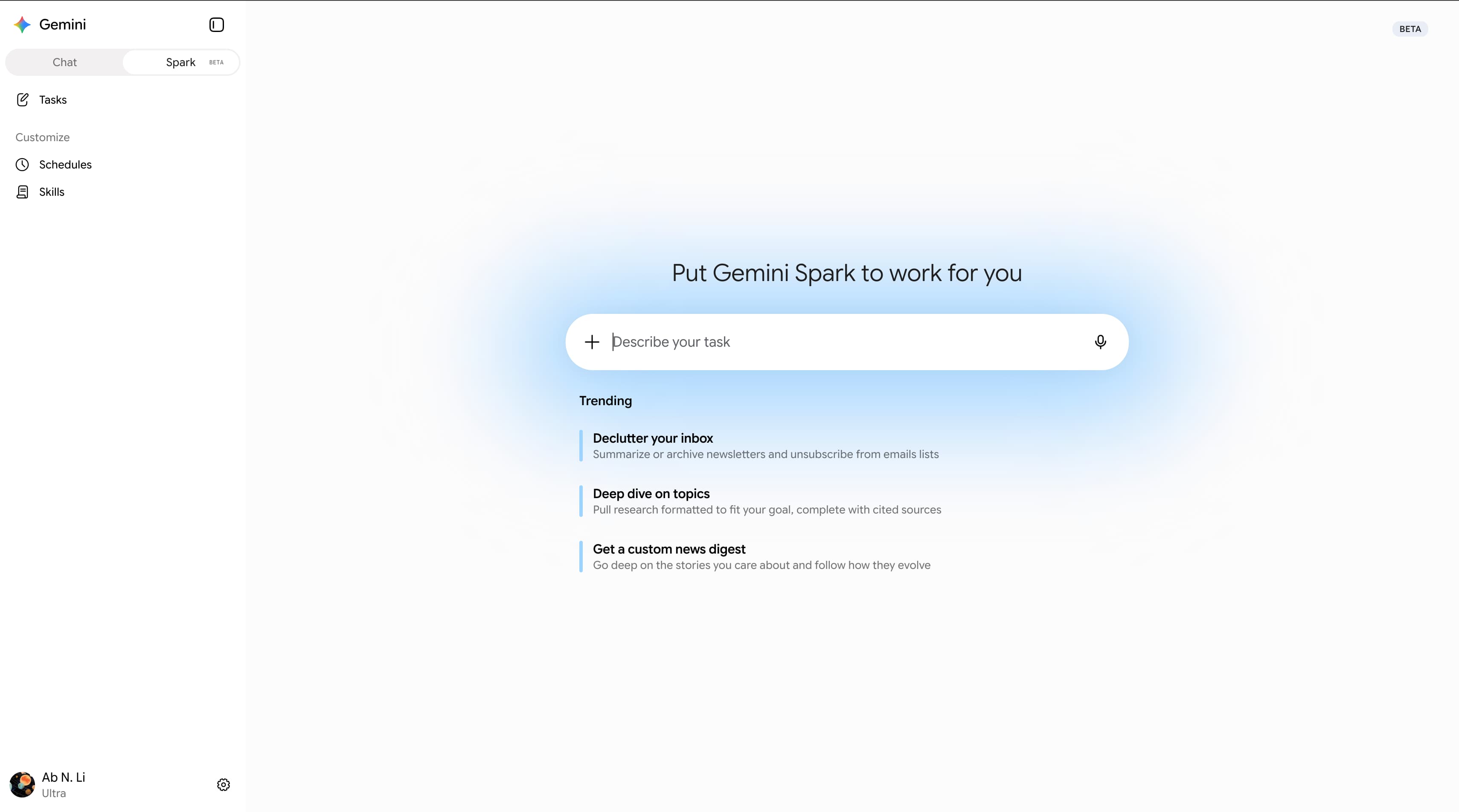 Flipping the Spark switch replaces the chat box with a task dashboard — Tasks, Schedules and Skills. (Source: 9to5Google)
Why it works: four ideas, not fifty features
Spark is built from exactly four moving parts. Once you see how they fit, the whole product makes sense.
Tasks — what you want. A goal, not a step list. "Go through the trip receipts in this Drive folder and tell me who owes whom."
Schedules — when it runs. On a clock (every morning at 7), or on an event (a stock moves, a news story develops, a local event is announced). This is the part that turns Spark from a tool you open into a service that runs.
Skills — how it should do it. Reusable instructions you write once and reuse across tasks. If that sounds familiar, it should: it's the same idea as skills in Claude Code, and Spark even lets you upload one.
Connected Apps — what it can touch. Gmail, Calendar, Drive, Docs, Sheets, Slides, YouTube, Maps, Keep, Tasks. Third parties are arriving: Canva, Instacart, OpenTable. Every one of them is off by default — you turn on each connection deliberately.
Here's what a real Spark task actually looks like written out. It's a sentence, not a config file:
Every weekday at 7:00, scan my inbox from the last 24 hours.
Pull out anything with a hard deadline or a payment due.
Group by client, ignore newsletters, and email me one short digest.
That's the whole ergonomic story: you write the outcome in plain language, and the schedule turns it into something that happens whether or not you remember it.
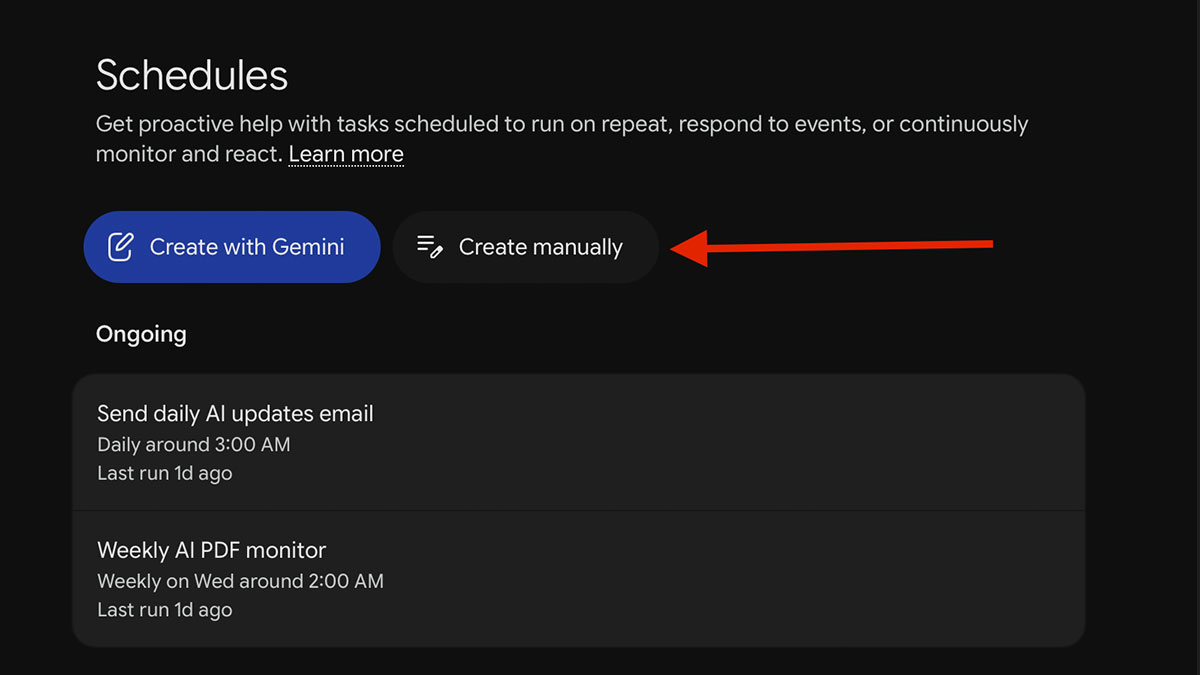 Schedules is where Spark stops being a chatbot. These ran at 3 AM without anyone opening the app. (Source: AI Agents Library)
What you actually get
It works while you don't. The task keeps running on Google's servers after you close the lid — so "I'll get to it tonight" stops being a promise you break. The work happens at 3 AM and the result is waiting at 7.
It reads your actual data, not a copy of it. Native access to Gmail, Drive and Calendar means no exporting, no pasting, no "here's my email, please summarize". That's the difference between a five-minute setup and a workflow you abandon after a week.
Recurring beats one-off. A one-time answer saves you ten minutes. A schedule that checks your credit card statement for new fees every month saves you ten minutes forever, and catches the month you would have skipped.
Skills make your standards portable. Write "how I want an email digest formatted" once, and every future task inherits it — so quality doesn't depend on how well you phrased the prompt today.
It asks before it acts — sometimes. Tasks can pause and wait on you. In the dashboard they show a "Needs input" badge instead of guessing. (Read the caveat below before you trust this too far.)
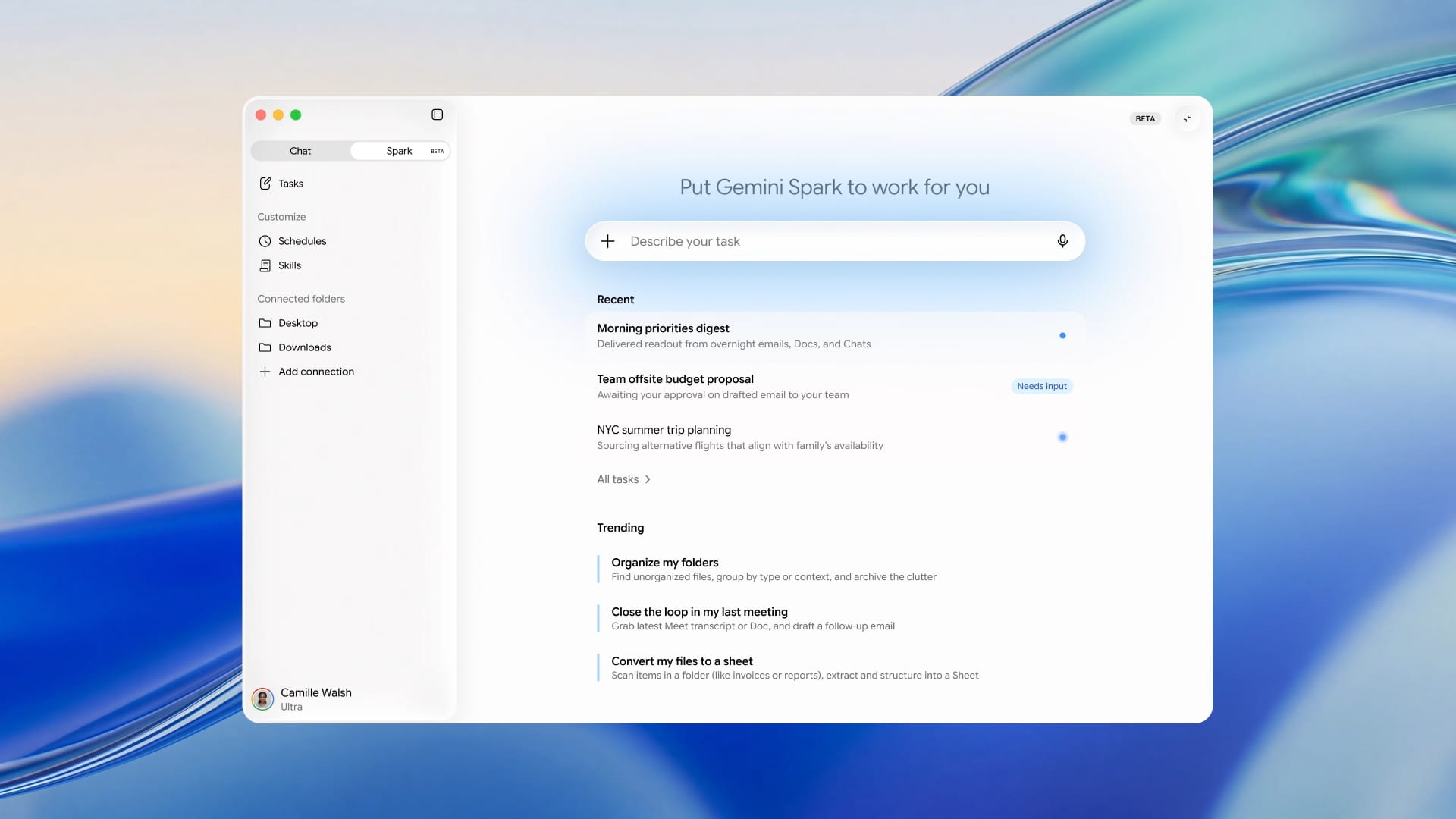 Three tasks in flight at once: one delivered, one waiting on your approval, one still working. This is the actual shape of the product. (Source: 9to5Google)
What it costs you
Money: there's no standalone price. Spark comes bundled with a paid Gemini plan. Since 23 July 2026 it's included in Google AI Pro at $19.99/month; before that it was Ultra-only at $99.99/month. Ultra still buys you higher limits.
Time: minutes, not days. There's no install, no config file, no CLI. The real setup cost is deciding which connections to switch on.
Capacity: you can have up to 15 tasks running at once. A schedule will not start a new task while 15 are already going — it just doesn't fire.
Geography: it rolled out in the US first. It is not available in the EEA, the UK, Switzerland, or Nigeria. Other countries are arriving gradually. Check your own account before you plan around it.
Attention: an agent working unsupervised still produces output someone has to check. Reviewers report Spark losing precision on long sessions, and the mobile experience trailing the desktop one.
⚠️ The permission gap is the real risk. Spark is supposed to check with you before "major" actions — but Google hasn't drawn that line precisely. Reporting suggests an outbound email can go out without a check-in. Treat every connection you enable as something Spark may act on unattended, and don't connect an account where a wrong send would be expensive.
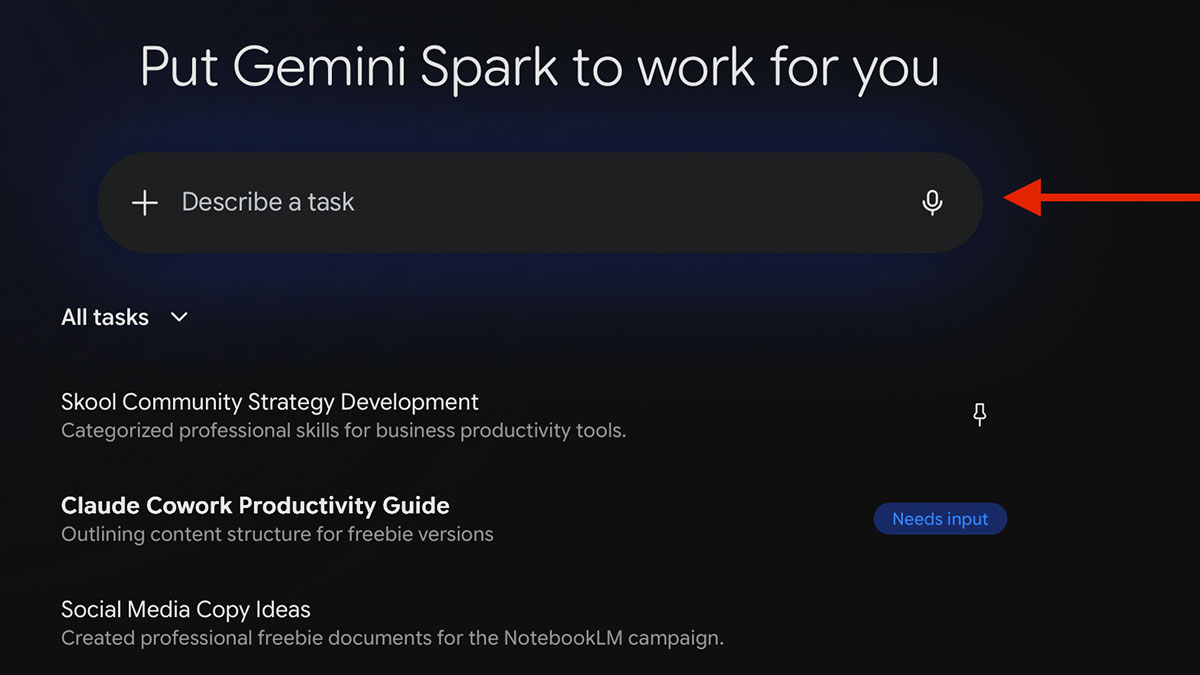 "Needs input" is Spark pausing to ask. The open question is which actions it decides don't need asking. (Source: AI Agents Library)
When to use it
Your work life already lives in Google. Gmail, Drive, Calendar. This is the single biggest predictor of whether Spark will be useful to you.
The task is recurring and low-stakes. Morning digests, monthly bill checks, weekly competitor monitoring, invoice sorting. Cheap if it's imperfect, valuable every single time it runs.
You want monitoring, not just answers. "Tell me when X changes" is something a chatbot fundamentally cannot do and a schedule does trivially.
Nobody currently owns the job. The best Spark tasks are the ones that are quietly not getting done at all.
When NOT to use it
Your company runs on Microsoft 365. Outlook, OneDrive, Teams — Spark can't reach any of it. It is close to useless here, no matter how good the agent is. Use Copilot, which sits inside that stack the same way Spark sits inside Google's.
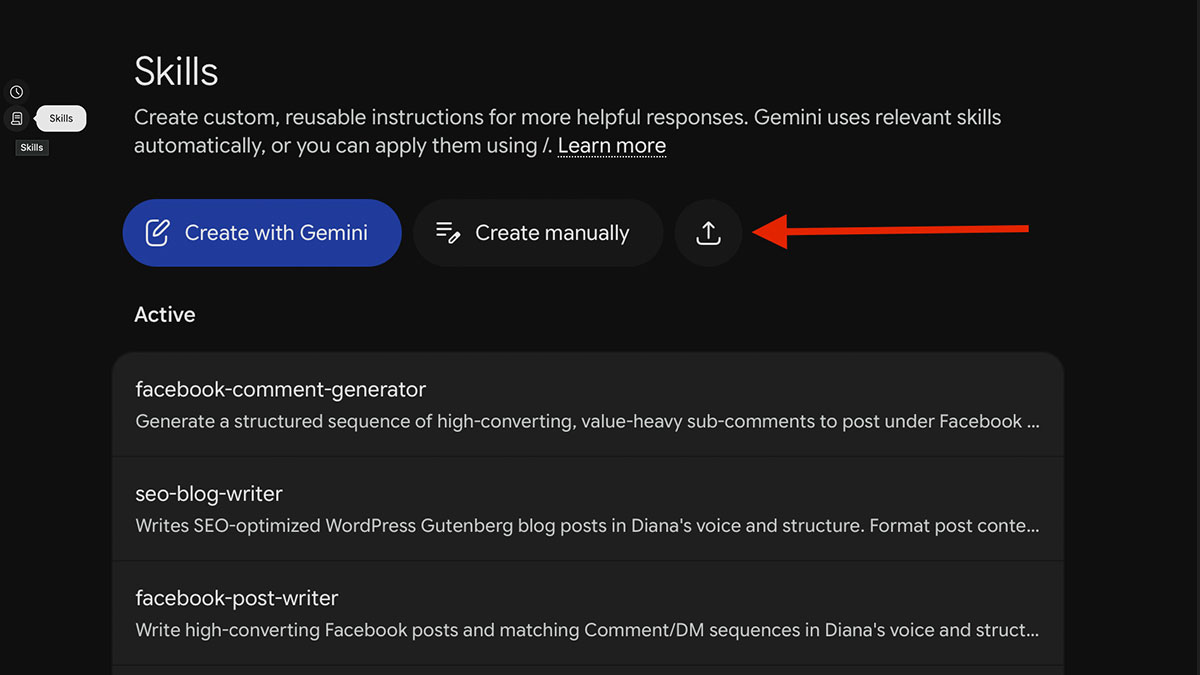 Skills are reusable instructions — write your standard once, reuse it everywhere. Familiar to anyone who's used Claude Code skills. (Source: AI Agents Library)
The work is code, content, or anything that needs versioning. Spark gives you no repository, no diff, no branch, no review. For work where you need to see exactly what changed and roll it back, use a developer agent like Claude Code — the whole point there is that every change is inspectable.
The action is irreversible or expensive. Sending client emails, moving money, publishing. The permission boundary isn't sharp enough yet to hand it something you can't undo.
You need it to be auditable. Spark's reasoning is a black box. If you're in a regulated context and must show why a decision was made, this is the wrong shape of tool.
You're outside the supported regions. No workaround worth building a habit on.
Spark vs the alternatives
| Gemini Spark | Microsoft Copilot | Claude Code | Doing nothing | |
|---|---|---|---|---|
| Best at | Recurring admin inside Google | The same, inside Microsoft 365 | Code, content, versioned work | — |
| Runs unattended | ✅ On Google's servers | Partly | Only while running | ❌ |
| Reaches Gmail/Drive natively | ✅ | ❌ | Via integrations | — |
| Auditable / reversible | ❌ Black box | Limited | ✅ Full diff + git | ✅ You did it |
| Cost | $19.99/mo bundled | Bundled with M365 | Dev subscription | $0 + your hours |
| The real catch | Google-only, US-first | Microsoft-only | Not for admin chores | The chasing never stops |
The honest read: doing nothing is a legitimate option if your admin load is small. Spark's value scales with how much repetitive Google-shaped work you have. Below a certain volume, the setup and the checking cost more than the chasing did.
📺 Gemini Spark | I/O 2026 Keynote — Google
The verdict
- Adopt it if your day already runs on Gmail, Drive and Calendar, you're in a supported country, and you can name three recurring chores nobody is doing. At $19.99 bundled into a plan you may already pay for, the bar to clear is low.
- Skip it if you're on Microsoft 365, outside the supported regions, or hoping it will handle code, publishing, or anything you'd need to audit. It won't, and the mismatch will cost you more than the subscription.
- What to do next: don't automate your whole life. Turn on one connection, write one schedule for one chore you keep forgetting, and let it run for two weeks. If the output is worth reading on week two, expand. If not, you've lost almost nothing.
FAQ
Do I need the $99.99 Ultra plan? No. Since 23 July 2026, Spark is included in Google AI Pro at $19.99/month. Ultra buys higher usage limits, not different features.
Can it work with Outlook or Notion? No. Spark's power comes from native Google access, and that's also its wall. Outside Google Workspace it has very little to work with.
Will it send emails without asking me? Possibly. Google says it checks before "major" actions but hasn't defined the term precisely, and reporting suggests outbound email may not always trigger a check-in. Don't connect an account where a wrong send is costly.
What breaks if we skip it entirely? Nothing breaks. You keep chasing. The question isn't whether you can live without it — it's whether the hours you spend on recurring admin are worth $20 a month to reduce.
Is it a replacement for a developer AI agent? No, and it isn't trying to be. Spark has no repo, no diff, no version history. It's built for your inbox, not your codebase — the two tools do genuinely different jobs.
How many things can it do at once? Fifteen tasks running simultaneously. Past that, schedules quietly don't fire — worth knowing before you build a wall of automations.
References
- Gemini Spark — official overview
- Google Support: Use Gemini Spark to manage tasks & workflows
- Google Support: Create & manage schedules in Gemini Spark
- TechCrunch — Google introduces Gemini Spark at I/O 2026
- 9to5Google — Spark rolls out to AI Pro users in the US
- Forbes — the warning Google left out of the announcement
- AI Agents Library — Tasks, Skills & Schedules explained
- Gemini Spark availability by country
Image credits: 9to5Google, AI Agents Library.
#GeminiSpark #AIAgents #GoogleWorkspace #Automation #AITools #Productivity
✍️ The Author: Do Ngoc Hoan Founder of CookConnects.ca & Wizy.ca. Bridging the gap between advanced algorithms and business execution. I write for technical founders looking to scale their impact with AI and robust engineering.