One Mac Inbox for Gmail, Outlook and Zoho: Which App Is Worth It (and Which Isn't)
Three inboxes, three tabs, missed client mail. Thunderbird vs Outlook vs Spark vs Apple Mail compared — plus the October 1, 2026 Microsoft change that can break your work inbox.
If you have a Gmail, an Outlook or Microsoft 365 account for work, and a Zoho Mail address on your own domain, you don't need three browser tabs. One Mac email app can hold all three. The short verdict: Thunderbird if you want free and private, Outlook for Mac if your company runs on Microsoft 365, Spark if you want AI and a smart inbox, and Apple Mail if you just want it to work.
The catch nobody mentions: from October 1, 2026, Microsoft starts switching off the old connection some Mac apps use to talk to Microsoft 365. Pick your app with that date in mind.
The problem, honestly: three inboxes, three habits
Here's the typical week. Gmail is open in Chrome. Outlook is its own heavy app because work requires it. Zoho Mail — the one on your business domain, where clients actually write — lives in a tab you forget about until someone calls asking why you never replied.
What most people do today is "tab juggling": keep everything in the browser and check each one by hand. It costs nothing, but it has three hidden costs:
- You miss mail. A tab you don't look at is an inbox you don't read.
- No single search. "Where did that invoice come from?" means searching three places.
- No offline copy. On a plane or bad café Wi-Fi, your mail is gone.
A desktop email app (an "email client" — a program that downloads and shows mail from any provider, the way a TV shows any channel) fixes all three at once.
What is a unified inbox? (in plain English)
Think of it like one mailbox at your front door that receives letters from three different postal companies. You still have three addresses. You just open one box.
Technically, the app logs in to each provider and pulls mail down using a standard language. For Gmail and Outlook it signs in through the provider's own login page (called OAuth — you type your password on Google's or Microsoft's page, never inside the app). For Zoho it usually uses IMAP, the decades-old universal standard for reading mail.
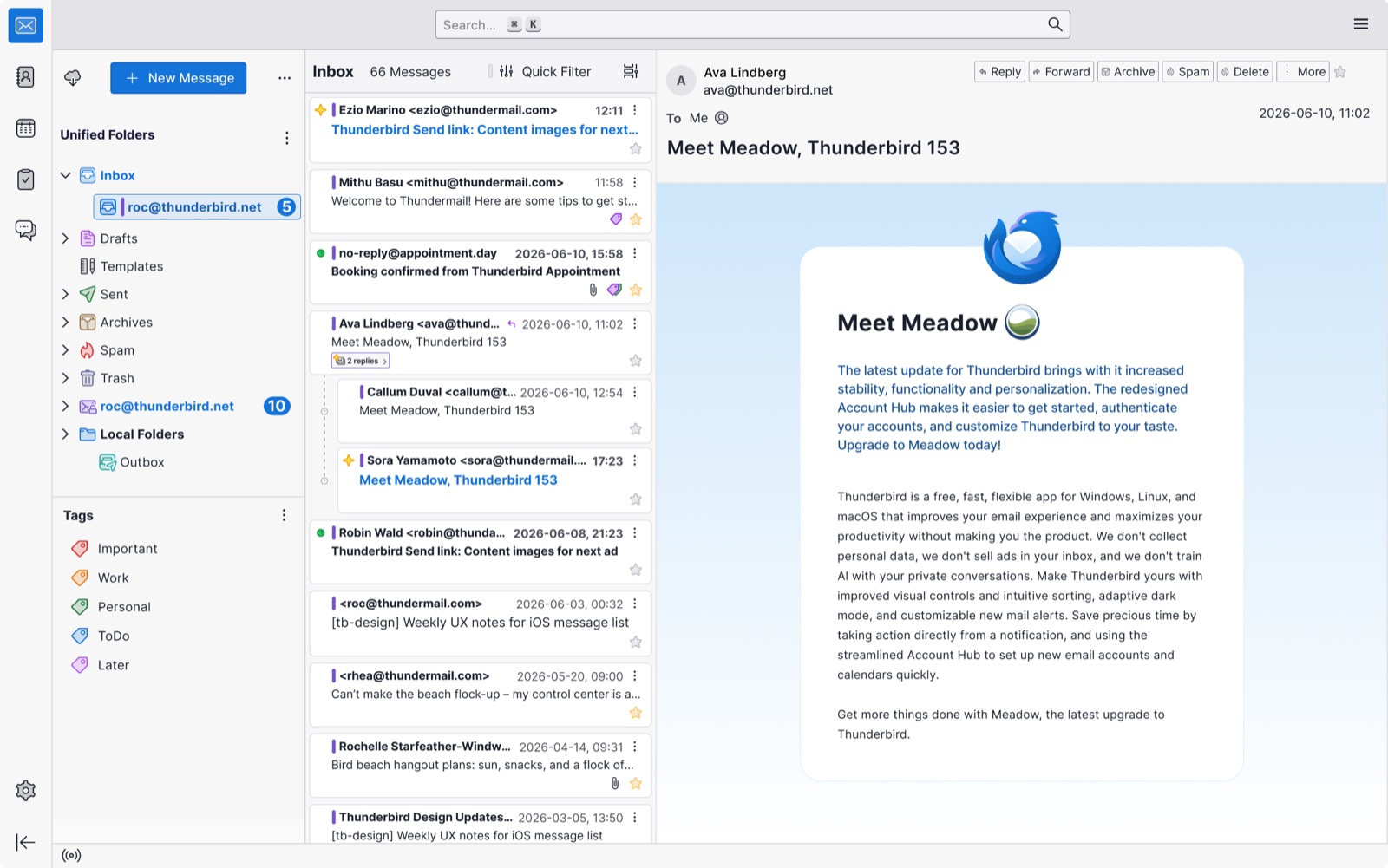 Thunderbird 153 "Meadow": "Unified Folders" at the top-left merge the inboxes of every account into one list. (Source: Thunderbird.net)
Why it works: every provider speaks a common language
The reason one app can handle Gmail, Microsoft and Zoho is boring, and that's good news: all three still support standard protocols.
- Gmail — OAuth sign-in plus IMAP. Every serious app supports it.
- Zoho Mail — IMAP and SMTP (SMTP is the "sending" half of email). Works in any app, once you switch IMAP on inside Zoho.
- Microsoft 365 / Outlook — this is the one that changes. Apps used to connect through EWS (Exchange Web Services, Microsoft's older private connector). Microsoft is replacing it with Microsoft Graph, its newer connector.
⚠️ The October 2026 cliff. Microsoft blocks EWS in Exchange Online (the cloud version of Microsoft 365) from October 1, 2026, unless your IT admin explicitly allows it, with full retirement by April 2027. Any app that reaches your work mailbox only through EWS will stop syncing. Company servers you host yourself (on-premises Exchange) are not affected.
Thunderbird already moved: version 154 (released September 2, 2026) added Microsoft Graph. But it's email only for now — calendar and contacts for Microsoft accounts aren't supported yet — and accounts set up the old way have to be removed and added again to switch over.
What you actually get
- One place to read and reply — so a client email on your Zoho domain doesn't sit unread for three days.
- One search box across every account — so "that PDF from March" takes 5 seconds, not 5 minutes.
- Offline copies — so you can clear your inbox on a flight and everything sends when you land.
- Separate "send from" identities — so you reply to a client from your business address, not your personal Gmail, without thinking about it.
- Calendar next to mail (in most apps) — so a meeting invite from Gmail and one from Outlook appear on the same week view.
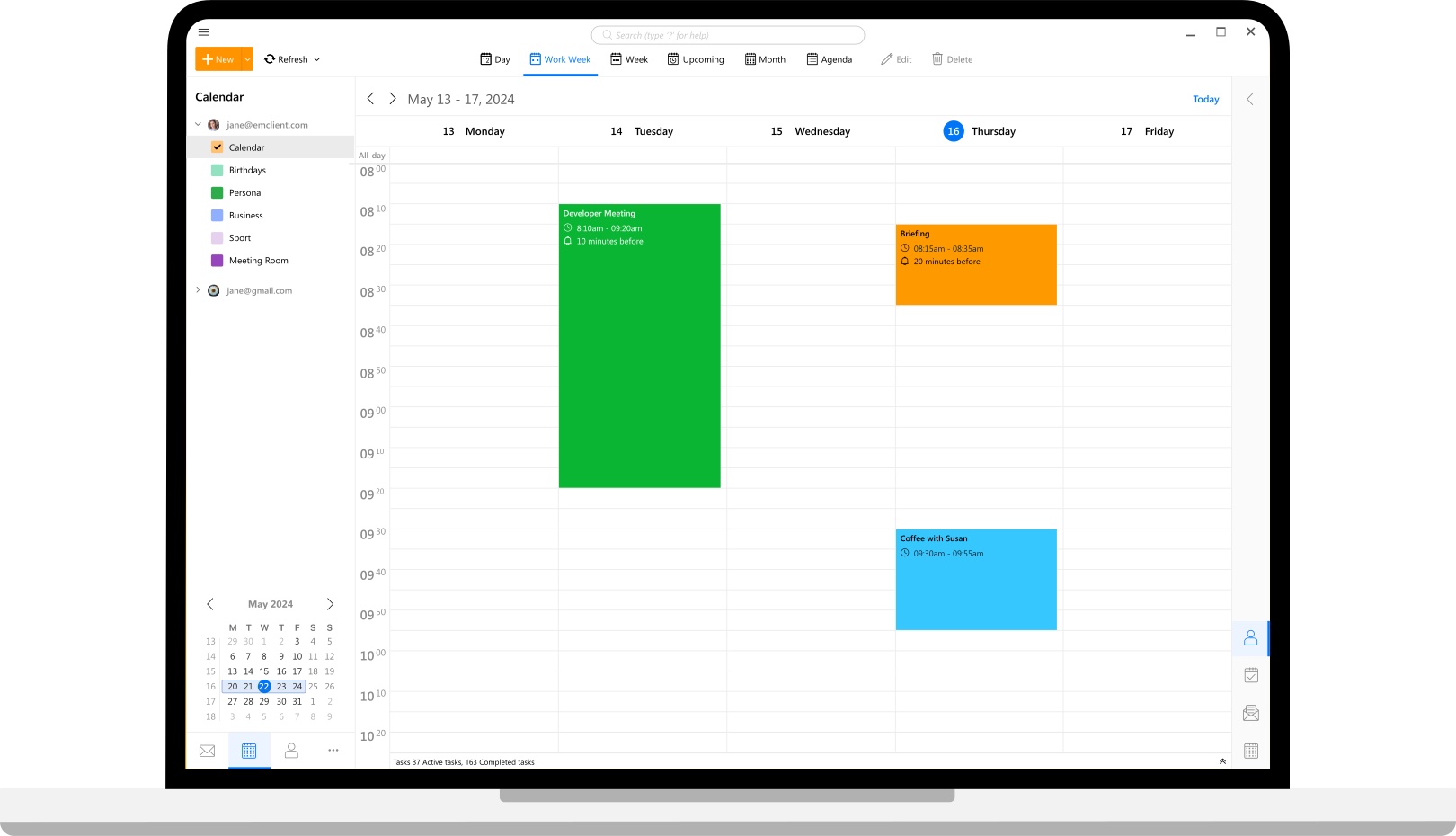 eM Client puts calendars from different accounts (here a company address and a Gmail) in one week view. (Source: eM Client)
The contenders, compared
All of these run on macOS and connect to Gmail, Microsoft 365/Outlook, and Zoho (Zoho through IMAP). Prices checked in September 2026 — they change often, so confirm before paying.
| App | Price | Microsoft 365 connection | Best at | Watch out for |
|---|---|---|---|---|
| Thunderbird | Free, open source | Graph (v154+), email only | Privacy, control, no cost | Microsoft calendar/contacts not ready yet; less "Mac-like" look |
| Apple Mail | Free, built in | Exchange | Simplicity, iPhone sync | Weak Gmail labels, few power features |
| Outlook for Mac | Free for Gmail, iCloud, IMAP; full features with Microsoft 365 | Native, best in class | Companies on Microsoft 365, meetings | Heavy; Zoho/IMAP feels second-class |
| Spark (Readdle) | Free (unlimited accounts); Plus $99/yr, Pro $199/yr | Yes | Smart Inbox, AI writing, team sharing | Some features route through Readdle's servers; old ~$60/yr plan is gone |
| eM Client | Free for 2 accounts (personal use only); Pro is paid | Yes | Outlook-style mail + calendar + tasks, lighter | Free tier forbids business use; Windows-style design |
| Canary Mail | Free; Growth $36/yr, Pro+ $100/yr (lifetime options) | Yes | Encryption, tracker blocking, AI | Paid tiers are annual or lifetime only |
| Mailbird | Free for 1 account; paid from $49.50 one-time | Yes | Multi-account plus apps like WhatsApp, Slack | Mac version is new (2024); complaints about upsells |
| Do nothing (browser tabs) | Free | — | Zero setup | Missed mail, no shared search, no offline |
Not a fit for this three-provider setup: Mimestream and Shortwave (Gmail only), Superhuman (Gmail and Outlook, no Zoho, premium price), and Postbox (discontinued in 2024).
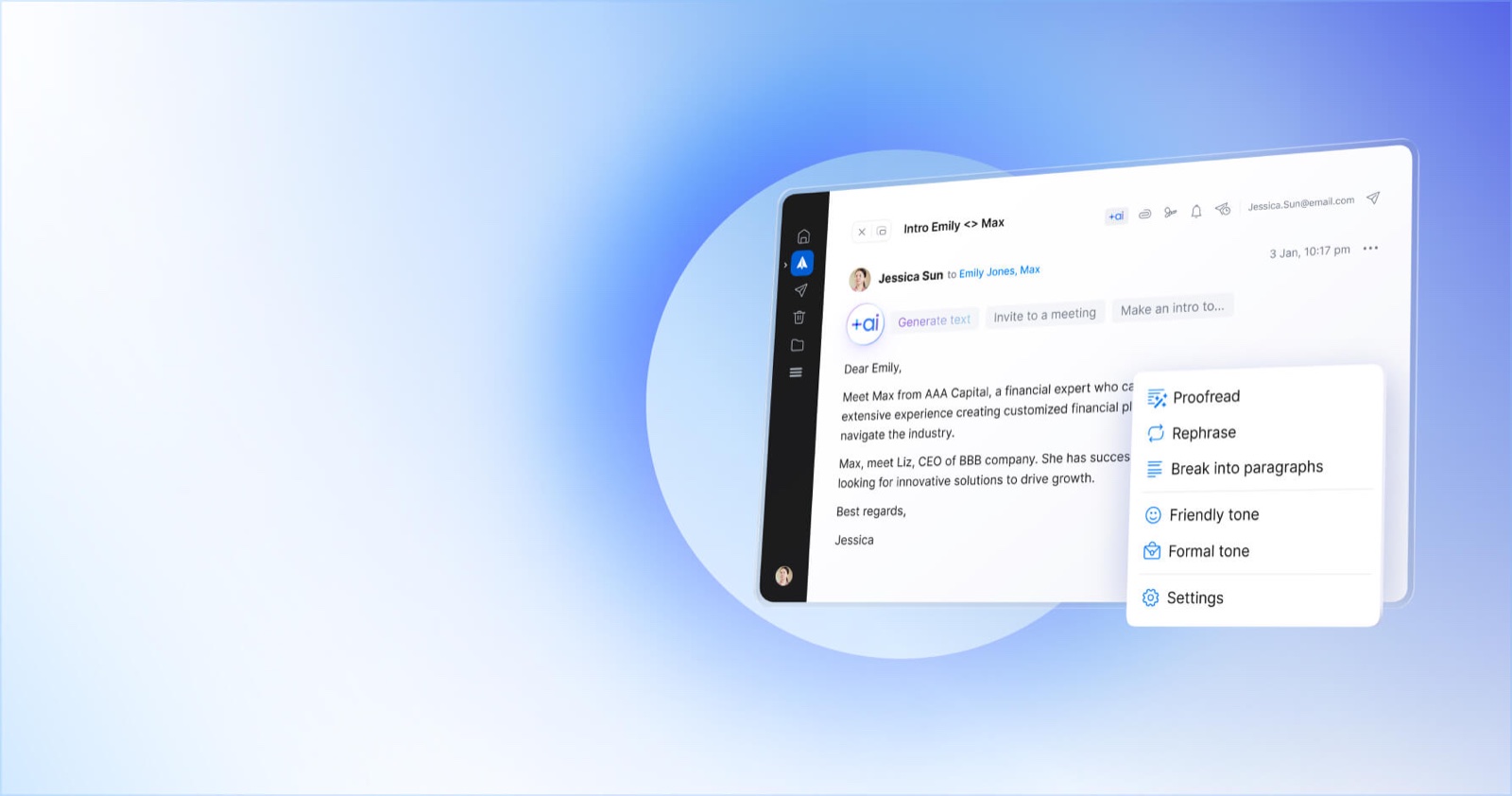 Spark's paid tiers add AI writing help — rephrase, proofread, switch tone — on top of the free Smart Inbox. (Source: Spark Mail)
What it costs you
Money: from $0 (Thunderbird, Apple Mail, Outlook, Spark Free) to about $100–$200 a year per person for AI and team features.
Time: about 15 minutes. Gmail and Microsoft are "type your email, click Sign in." Zoho is the only one that needs a little prep — switch on IMAP in Zoho's settings first, and if you use two-factor login, create an app-specific password (a one-off password just for this app). The server details look like this:
Incoming (IMAP):  imap.zoho.com      (personal)   | imappro.zoho.com  (your own domain)  port 993, SSL
Outgoing (SMTP):  smtp.zoho.com      (personal)   | smtppro.zoho.com  (your own domain)  port 465 SSL / 587 TLS
This is everything the app needs to reach Zoho. If your account was created in Europe or India, the address ends in .eu or .in instead.
Discipline: you have to actually close the browser tabs. An app that sits next to three open webmail tabs just gives you four places to check.
⚠️ Where the value disappears: if your company's IT controls which apps can connect to Microsoft 365, a third-party app may be blocked outright. Ask before you spend an afternoon setting it up.
When to use a unified Mac email app
- You run a small business on a Zoho domain but also have personal Gmail and a client's or employer's Microsoft 365 account.
- You answer email for a living — sales, support, consulting — and a missed message costs real money.
- You travel and need to work through your inbox offline.
- You want one calendar that shows Google and Microsoft invites together.
When NOT to use one
- Your work is 95% inside Microsoft 365 with Teams meetings. Use Outlook for Mac on its own. A third-party app adds a layer IT won't support.
- You live in Gmail's features (labels, snooze, Gemini). Most apps show labels as clumsy folders. Stay in Gmail on the web, or use a Gmail-only app like Mimestream.
- Your company forbids third-party mail apps or cloud processing. Skip Spark-style apps whose features go through the vendor's servers. Use Apple Mail or Thunderbird, which talk to your provider directly — or just use the official apps.
- You check a secondary inbox once a month. Set up forwarding from Zoho to Gmail instead. It's free and takes two minutes.
The verdict
- Want free, private, and no strings? Thunderbird — just make sure you're on version 154 or newer if you have a Microsoft 365 account.
- Your company runs on Microsoft 365? Outlook for Mac, and add Gmail and Zoho to it. It's free.
- Want AI and a smart inbox and don't mind a subscription? Try Spark Free first; pay for Plus only if the AI features save you real time.
- Want nothing to think about? Apple Mail. It's already on your Mac.
FAQ
Is a free app good enough for a small business? Yes. Thunderbird, Apple Mail and Outlook for Mac are free for business use. Watch out for eM Client: its free tier is for personal use only.
What happens to my work email on October 1, 2026? If your app still connects to Microsoft 365 through EWS, it will stop syncing unless your IT admin allows it. Outlook for Mac and apps that use Microsoft Graph are fine. In Thunderbird, update to 154+ and re-add the account.
Is it safe to let a third-party app read my email? Apps that sign in through Google's or Microsoft's own login page never see your password. The bigger question is where your mail is processed: some apps (like Spark) route features through their own servers. Read their privacy page if your mail contains client data.
Do I lose anything if I leave everything in the browser? No money — but you lose one shared search, offline access, and the safety net of seeing every inbox in one place.
Can I try one without breaking my current setup? Yes. These apps sync via IMAP, OAuth or Graph, so your mail stays on the server. Uninstall the app and nothing is lost.
References
- Thunderbird — Native Microsoft Exchange support (Nov 2025)
- Thunderbird — Microsoft Graph API support (Sep 2026)
- Microsoft — Deprecation of EWS in Exchange Online
- Microsoft — Outlook for Mac
- Zoho Mail — IMAP and SMTP configuration
- Spark — Pricing
- Canary Mail — Pricing
- eM Client
- Image credits: Thunderbird.net, eM Client, Spark Mail (Readdle)
#EmailClient #macOS #Gmail #Outlook #ZohoMail #Thunderbird #Productivity
✍️ The Author: Do Ngoc Hoan Founder of CookConnects.ca & Wizy.ca. Bridging the gap between advanced algorithms and business execution. I write for technical founders looking to scale their impact with AI and robust engineering.