MCP Explained: Why an AI That Can Touch Your CRM Beats One That Just Talks
Your AI gives great advice, then leaves you the data entry. MCP is the standard that lets it actually act inside your CRM — why a CRM like Wizy shipping MCP matters, and the security cost nobody advertises.
Most "AI in your CRM" is a chatbot that can talk about your business but can't touch it. MCP — the Model Context Protocol — is the standard that closes that gap: it lets an AI assistant actually read your leads, update a booking, and log a follow-up, instead of telling you how to do it yourself. If you run a service business and you already pay for a CRM, this is the difference between AI as a demo and AI as staff.
The problem, honestly
You've probably tried this already. You open ChatGPT or Claude, paste in a messy list of leads, and ask it to sort out who to call first. It does a genuinely good job.
Then nothing happens.
Because the AI lives in a browser tab and your customers live in a CRM, the result of all that thinking has to be carried across by hand. You copy the summary. You open the CRM. You retype the notes. You set the reminders yourself. The AI did the easy part — the thinking — and left you the tedious part.
Multiply that by a week. Fifty new leads from Google, Instagram, and walk-ins. Twenty bookings to confirm. Ten customers who haven't been back in ninety days and should be. Every one of those is a small decision plus a small data-entry chore, and the chore is what actually eats your evening.
The usual fixes don't really fix it:
- Zapier-style automations are rigid. They fire on a trigger and do exactly one thing. They can't look at a lead and decide it's not worth chasing.
- A CRM's built-in "AI features" are whatever the vendor shipped. If you want it to behave differently, you wait for the roadmap.
- A custom integration means a developer, an API key, and a project. For a salon or a restaurant, that's not happening.
What you actually want is the assistant you already like, working inside the system you already pay for. That's the thing MCP makes possible.
What is MCP, in plain English?
Think of a USB-C port.
Before USB, every device had its own plug. Printers, mice, cameras, phones — each one needed a different cable and a different driver. Then one port shape won, and suddenly any device could talk to any computer.
MCP is that port, for AI. It's an open standard that defines how an AI application (Claude, Cursor, Codex, ChatGPT) connects to an outside system (your CRM, your database, your file storage) and uses its capabilities.
The accurate version: MCP defines three roles. A host is the AI app you're using. A server is the thing being connected to — it publishes a list of tools the AI is allowed to call, like create_lead or list_bookings. The host runs one client per server, and they talk in a standard message format. The AI doesn't need custom code for your CRM. It just asks the server "what can you do?" and gets a menu back.
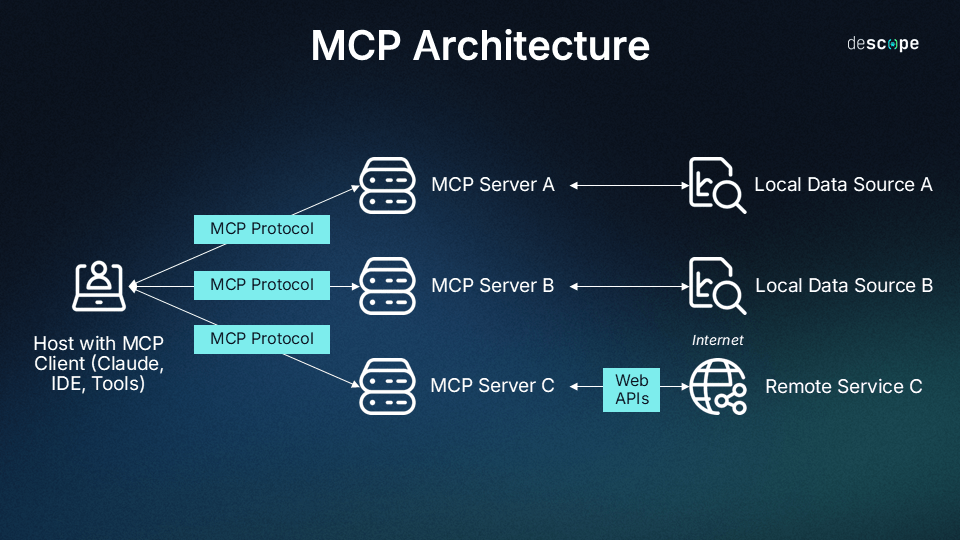 One AI app, one protocol, many systems — the whole point of a standard. (Source: Descope — What Is the Model Context Protocol)
Anthropic released MCP in November 2024 and donated it to the Agentic AI Foundation under the Linux Foundation in December 2025, co-founded with Block and OpenAI and backed by Google, Microsoft, AWS, Cloudflare and Bloomberg. It is no longer one company's idea. By March 2026 the MCP SDKs were being downloaded around 97 million times a month, and GitHub listed close to 16,000 public MCP server projects.
So what: if a tool you buy speaks MCP, you are not betting on one AI vendor. Claude today, something else in two years — the connection survives the switch.
Why "can touch it" beats "can talk about it"
Here's the mechanism, and it's simpler than it sounds.
Without MCP, an AI only has words. You describe your pipeline, it describes a plan back. Everything in between — the reading, the writing, the remembering — is you.
With MCP, the CRM hands the AI a menu of verbs. List the leads that came in this week. Read this customer's history. Create a task. Attach a file. Schedule the follow-up. The AI can now finish a job instead of narrating one.
That's the whole shift: from advice to action.
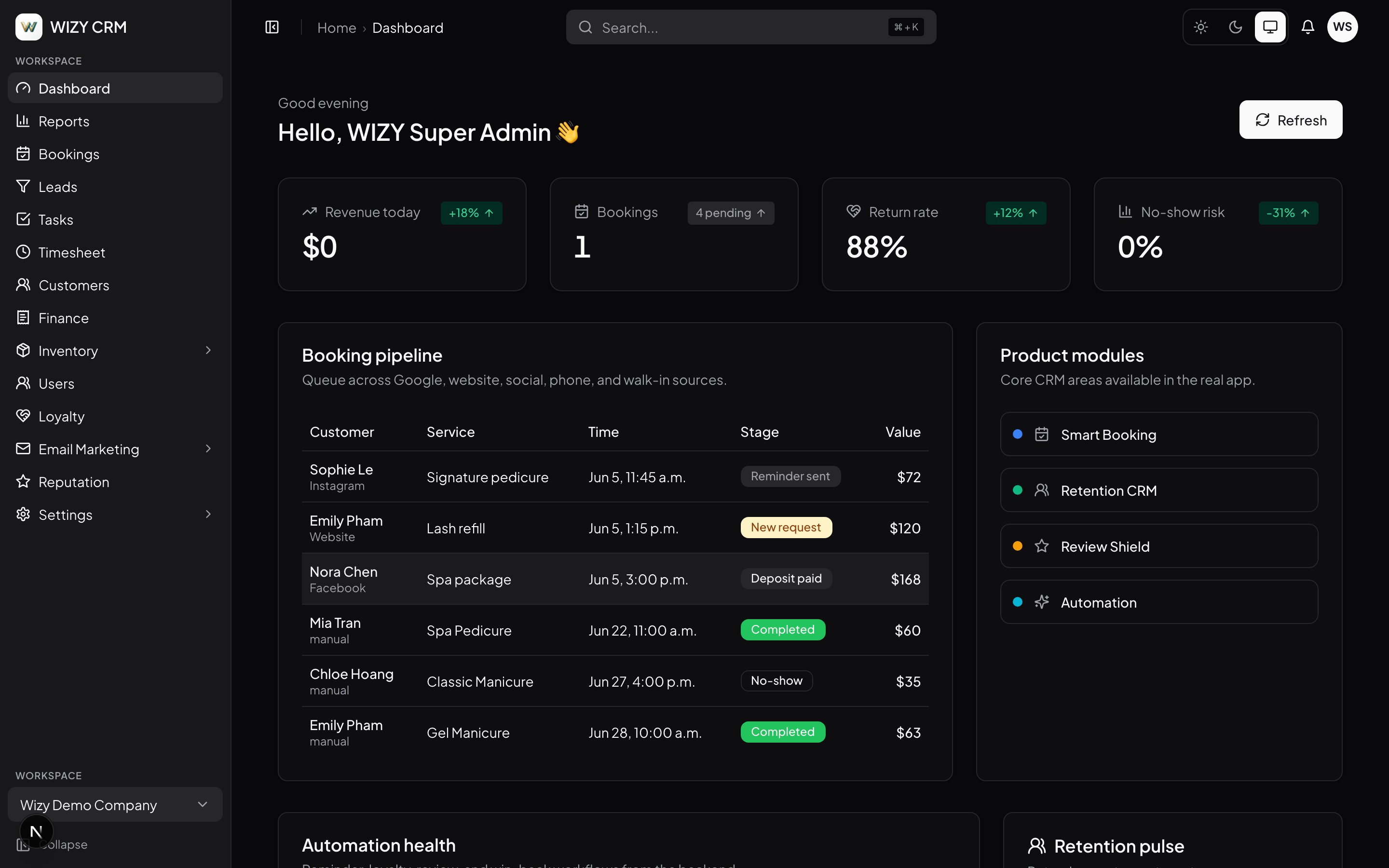 The same data a human reads on this dashboard is what an MCP-connected agent reads through tools. (Source: Wizy CRM)
It also solves a quieter problem: the AI stops guessing. A chatbot working from what you pasted knows only what you pasted. An agent with tools can go look. It can pull the actual booking history before deciding whether a customer is worth a win-back offer.
Why a CRM with MCP built in is a genuinely big deal
Plenty of software now has an API. Very little of it has an MCP server. The difference matters more than it sounds.
An API is a door for programmers. Using it means someone writes code, handles authentication, maps the fields, and maintains that code forever. An MCP server is a door for agents — the vendor has already done the translation work, so the AI arrives knowing what the tools are and how to use them.
Wizy CRM is a good example of what that looks like when a vendor commits to it. Connecting Claude, Codex, Cursor or any MCP client is a single command:
claude mcp add --transport http wizy-crm \
  https://api.crm.wizy.ca/v1/mcp \
  --header "Authorization: Bearer wizy_sk_..."
This registers the CRM as a tool source for your AI assistant. After it runs, the assistant can see 20+ CRM tools — leads, customers, tasks, bookings, files, comments — and use them on your instruction.
That's the entire integration. Not a project. One line, and the assistant you already use becomes a member of staff who can read the pipeline.
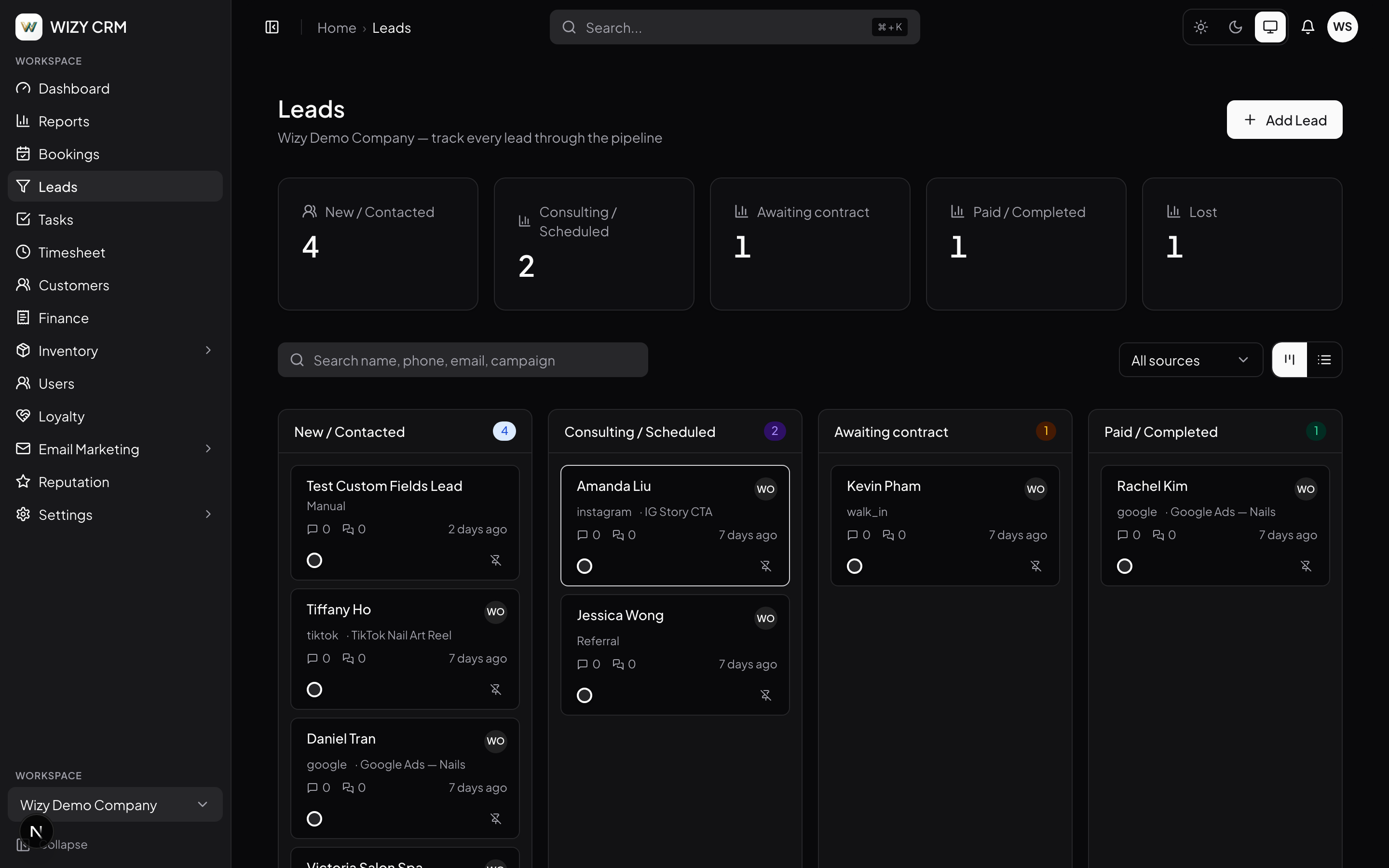 A pipeline like this is what "20+ tools" actually means in practice — every stage, note and follow-up is something an agent can read and update. (Source: Wizy CRM)
What you actually get:
- The night-shift admin you never hired. Ask once — "qualify this week's leads and draft the follow-ups" — and come back to a sorted pipeline. So what: the two hours you spend on data entry each week go back into serving customers.
- No vendor lock-in on the AI side. Any MCP client works. So what: when a better model ships, you switch clients, not systems.
- Zero prompt engineering. Wizy ships guided prompts that teach agents how to qualify a lead from evidence and plan follow-ups from your templates. So what: your manager doesn't need to become a prompt expert to get consistent output.
- An audit trail that names the AI. Every agent action lands in the log with an MCP badge. So what: when something looks wrong next month, you can tell whether a human or an agent did it.
What it costs you — and the part nobody advertises
Time and money first: connecting takes minutes, not days. Wizy doesn't publish pricing publicly, so the honest answer is you'll need a consultation to know your number; they quote setup in 48 hours.
The real cost is thinking about permissions, and this is where I'd push back on anyone selling MCP as pure upside.
Giving an AI the ability to write into your customer database is a real security decision. The research in 2026 has not been kind here. In April 2026 a team including Johns Hopkins researchers hijacked Claude Code, Gemini CLI and GitHub Copilot by hiding instructions inside GitHub pull-request titles — the agents read the poisoned text as an order and leaked secrets. The MCPTox benchmark tested 20 leading agents against 45 real MCP servers and found attack success rates as high as 72.8% on some models. The uncomfortable finding: more capable models were often more vulnerable, because they're better at following instructions — including bad ones.
MCP itself does not solve this. It's a connection standard, not a security product. The protection has to come from the server side — from the CRM.
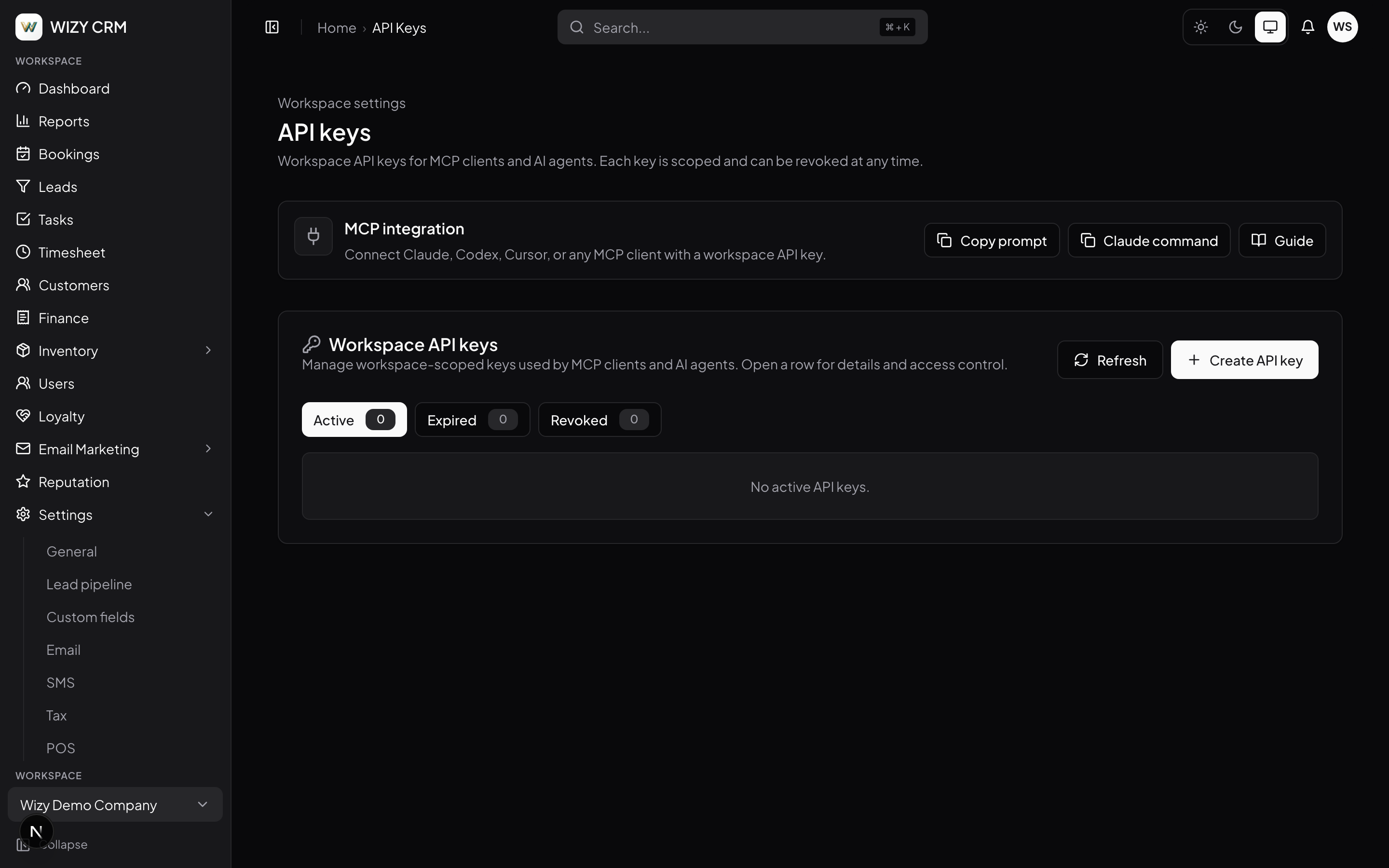 This screen is the actual answer to "what if the AI does something stupid" — scoped keys, one-click revoke, and a visible active/expired/revoked state. (Source: Wizy CRM)
This is the part of Wizy's design I'd point at if you're evaluating any MCP-enabled CRM. Every agent uses a workspace API key with explicit scopes, revocable instantly. Module gating, rate limits and workspace isolation are enforced server-side — not requested politely in a prompt, but enforced by the system, which is the only kind of guardrail that survives a prompt-injection attempt. And the line that matters most: agents draft and organise; humans keep the send button. No AI is emailing your customers on its own.
⚠️ The value evaporates if you hand out one all-powerful key and never look at the audit log. MCP's safety story is entirely about scoping and review. A vendor that offers MCP with a single unrestricted key and no logging is offering you risk with extra steps — that is the question to ask before you connect anything.
When it's clearly worth it
- You run a service business with a real pipeline — salon, clinic, restaurant, trades — and lead follow-up is the thing that keeps slipping.
- You already use Claude, Cursor or ChatGPT every day and are tired of copy-pasting between the AI and your system of record.
- You're a one- or two-person back office. MCP is at its best where nobody has time to do the admin properly.
- You're choosing a CRM right now. Then MCP support is close to free to require, and expensive to retrofit later.
When you should NOT bother
Be honest about these — most of the "AI CRM" pitch collapses in these cases.
- Your CRM is a spreadsheet and it's working. Twenty customers doesn't need an agent. Better alternative: a shared Google Sheet and a calendar reminder. Come back when the spreadsheet hurts.
- Your data is a mess. An agent reading half-empty records makes confident wrong decisions faster than you make slow right ones. Better alternative: spend the first month cleaning records, then connect.
- You're in a heavily regulated field with strict data-handling rules — health records, financial files. Better alternative: talk to your compliance lead before you connect anything, and keep the AI on read-only scopes if you connect at all.
- Nobody on the team will review the audit log. Guardrails you don't look at aren't guardrails. Better alternative: stick with fixed automations that can only ever do one predictable thing.
MCP CRM vs the alternatives
| CRM with MCP | Zapier / fixed automations | Chatbot + copy-paste | Stay as you are | |
|---|---|---|---|---|
| Setup effort | One command | Hours per workflow | None | None |
| Can it judge? | Yes — reads context, decides | No — fixed rules only | Yes, but can't act | You do it |
| Can it act in the CRM? | Yes, within scopes | Yes, narrowly | No | — |
| Switching AI vendors | Easy — any MCP client | N/A | Easy | — |
| Security burden | Real — needs scoped keys and review | Low | Low | None |
| Best for | Messy, judgement-heavy admin | Predictable, repetitive triggers | One-off thinking | Very small operations |
Staying as you are is a legitimate answer. If your admin load is two hours a week and you sleep fine, none of this pays for itself yet.
📺 Why we built—and donated—the Model Context Protocol (MCP) — Anthropic
The verdict
- Adopt it if you run a service business with a live pipeline, you already use an AI assistant daily, and your admin backlog is judgement work rather than mechanical work. A CRM that speaks MCP turns your assistant into staff, and the connection cost is one command.
- Skip it for now if your customer data is thin or messy, if nobody will own the audit log, or if your operation is small enough that the spreadsheet still wins.
- What to do next: don't start by connecting everything. Connect with a read-only scope, ask the agent to summarise this week's pipeline, and see whether its judgement matches yours. If it does, widen the scope one step at a time. If you're evaluating Wizy CRM, the questions worth asking are about scopes, the audit log, and which actions stay human-only — not about the tool count.
FAQ
Do I need a developer to set this up? No. On an MCP-ready CRM it's one command in your AI client. The developer work is the part the vendor already did.
Is my customer data safe? Safe-ish, and only if the vendor enforces scopes server-side. MCP alone provides no protection — 2026 research showed leading agents being hijacked through poisoned text. Ask how keys are scoped, whether revocation is instant, and whether every agent action is logged.
Can the AI email my customers by mistake? On a well-built system, no — sending stays a human action. Wizy states this explicitly: agents draft and organise, humans keep the send button. Verify this claim for any vendor before you connect.
What does it cost? The MCP connection itself costs nothing beyond your CRM and AI subscriptions. Wizy doesn't publish pricing; they offer a free consultation and quote a 48-hour setup.
We're a two-person salon. Is this overkill? Probably not, if lead follow-up is slipping — that's exactly the pain MCP addresses. It is overkill if your customer records are incomplete. Clean the data first.
What if we switch away from Claude later? That's the main argument for MCP over a proprietary integration. Any MCP client — Codex, Cursor, ChatGPT — connects to the same server. You change clients, not systems.
References
- Model Context Protocol — official documentation
- Anthropic — Introducing the Model Context Protocol
- Anthropic — Donating MCP and establishing the Agentic AI Foundation
- Wizy CRM — AI agents via MCP
- Descope — What Is the Model Context Protocol (MCP) (architecture diagram)
- Checkmarx — MCP Security: Risks, Real Incidents & Controls (2026)
- Microsoft Security — Securing AI agents: when AI tools move from reading to acting
#MCP #ModelContextProtocol #AIAgents #CRM #WizyCRM #SmallBusinessAI #AIStrategy
✍️ The Author: Do Ngoc Hoan Founder of CookConnects.ca & Wizy.ca. Bridging the gap between advanced algorithms and business execution. I write for technical founders looking to scale their impact with AI and robust engineering.