OpusClip: The AI Clip Cutter That Only Pays Off If You Already Have Footage
Sitting on hours of talking footage nobody has time to edit? OpusClip turns it into captioned Shorts for –29/month, but it still needs a human reviewer, and its billing needs watching.
OpusClip takes a long video you already filmed, like a podcast, an interview or a founder talking to camera, and turns it into short vertical clips with captions, ready for TikTok, Reels and Shorts. For anyone sitting on hours of talking footage, it is worth $15–29 a month. If you have no footage, need exact brand control, or post in a language other than English without someone checking the captions, it won't do much for you.
The problem, honestly
You know short video works. Your competitors post Reels every day. And you have the raw material: a 45-minute interview, a livestream, a webinar nobody rewatched.
What you don't have is the editing hours. Someone has to watch the whole thing, find the 30 seconds that make people stop scrolling, crop it vertical, keep the speaker in frame, add captions, and repeat that eight or ten times.
So most businesses do one of two things. They pay an editor, or they post nothing. The footage just sits on a hard drive.
What is OpusClip? (in plain English)
Think of a very fast intern who watches your whole video, marks the best moments with sticky notes, and hands you a stack of rough cuts.
That's OpusClip. You upload a long video or paste a YouTube link. Its AI (the company calls its models ClipAnything and ReframeAnything) looks for strong moments, cuts them into short clips, reframes them to 9:16 so the speaker stays centred, burns in animated captions, and gives each clip a Virality Score, its own guess at how well the clip will perform.
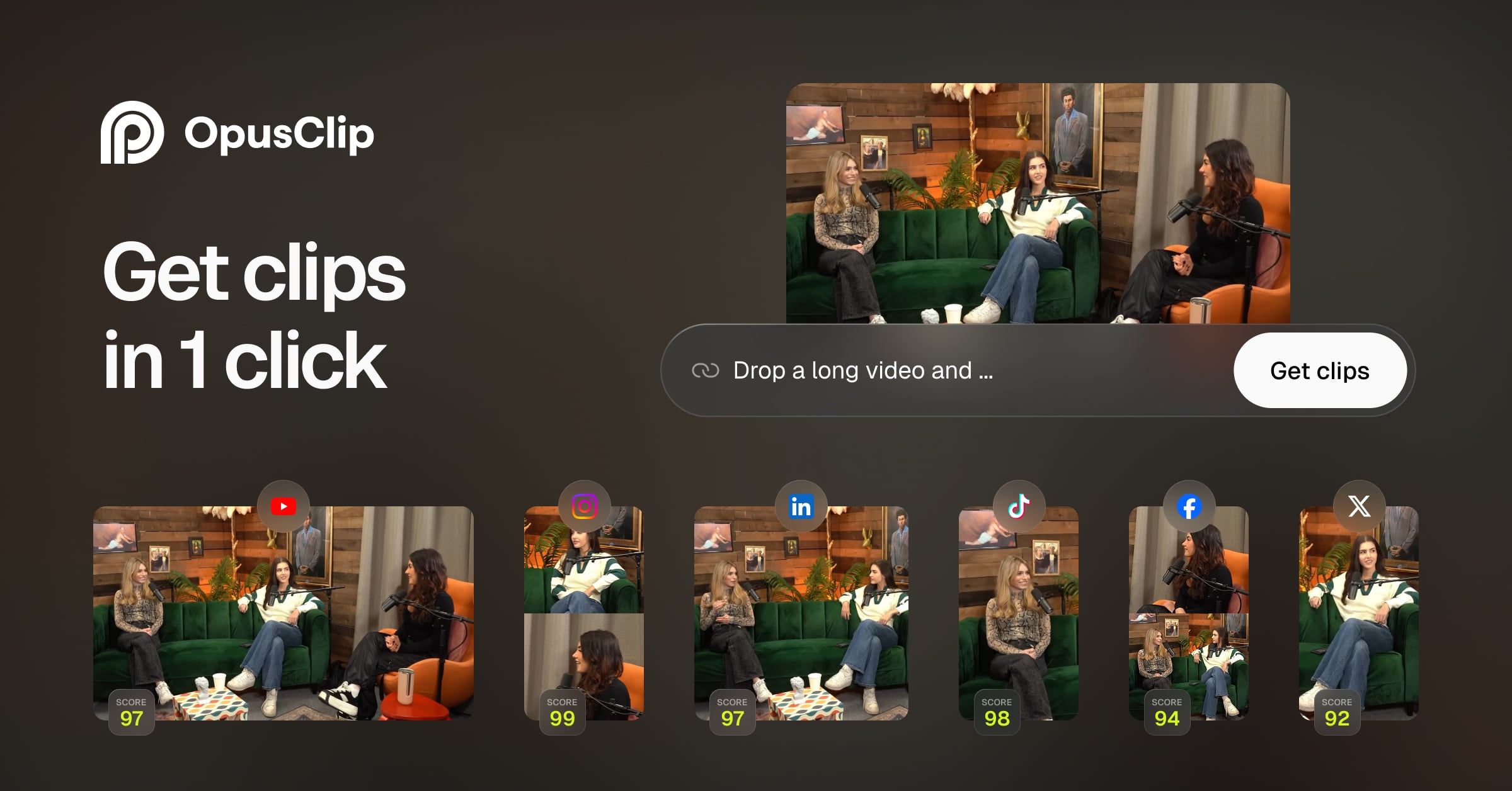 One long podcast in, several scored clips out, one per platform. The "SCORE" badge is OpusClip's Virality Score. (Source: OpusClip)
It is not a small side project. The homepage claims 16M+ creators and businesses, and a third-party tracker reports about $92M raised, with SoftBank leading its Series A (checkthat.ai).
Why it works
The slow part of short-form video usually isn't the editing software. It's finding the moment.
A human editor has to watch 45 minutes to find 5 good ones. OpusClip reads the transcript, the audio and the visuals together, so it can shortlist candidates in minutes. After that the human job is to judge clips, not hunt for them. Judging is much faster.
Captions matter for the same reason. Most people scroll with the sound off, so a clip without captions barely registers. OpusClip generates animated, keyword-highlighted captions in 20+ languages automatically.
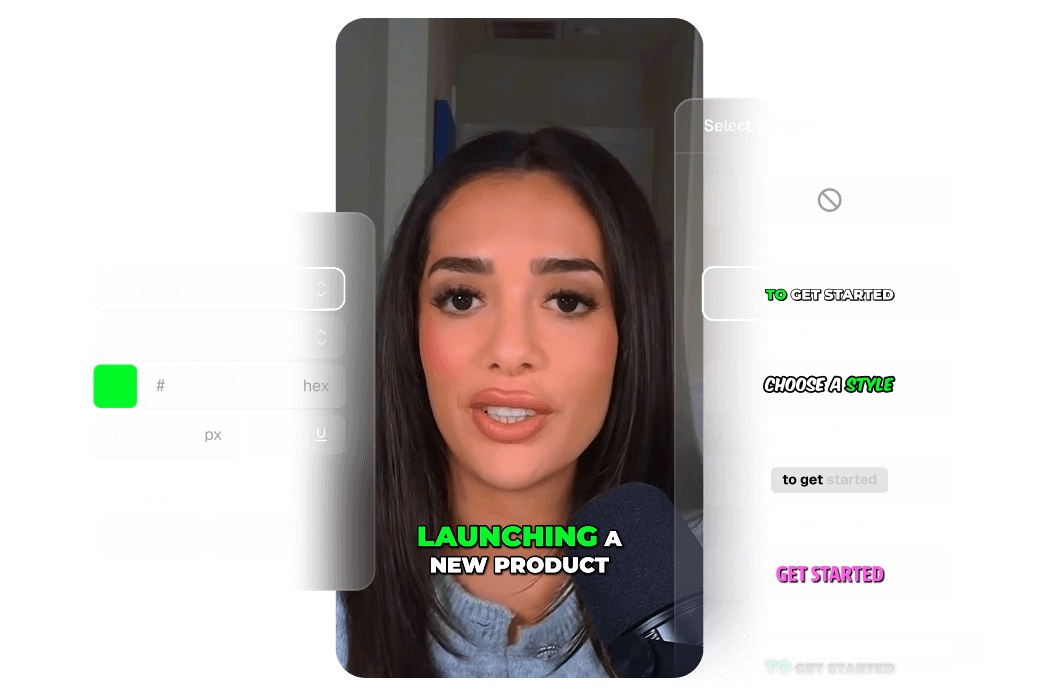 Animated caption templates: pick a style once, and every clip gets it. (Source: OpusClip Captions)
What you actually get
- A first cut, not a blank timeline. You start from a shortlist of clips. That's where the hours go back into your week.
- Vertical reframing that follows the speaker. Wide interview footage becomes 9:16 without someone manually keyframing a crop, so one shoot can feed TikTok, Reels and Shorts.
- Export to Premiere Pro and DaVinci Resolve (Pro plan). If you have an editor, they get a real project file to polish instead of fighting OpusClip's built-in editor. That keeps you from being locked in.
- AI Producer, the newer agent. It's aimed at single-speaker, talking-to-camera footage. You upload the raw take, it plans and runs the edit (trims pauses, adds captions, B-roll, music, sound effects), writes a log of what it changed, and you adjust it by chatting.
- An API and an MCP server. MCP (Model Context Protocol) is basically a USB port that lets AI assistants like Claude or ChatGPT use outside tools. OpusClip's hosted MCP server exposes 28 tools (clip, caption, reframe, edit, thumbnails, scheduling), so an AI agent can run the workflow for you.
 AI Producer's promise: raw footage in, a planned edit, then a finished clip. Note it's built for one person talking to camera, not for food shots or product b-roll. (Source: OpusClip Blog)
 The MCP server connects to Claude, ChatGPT, Cursor and VS Code. This matters if you're building automated content pipelines, not if you only clip a video a week. (Source: OpusClip MCP)
What it costs you
The money (USD, from the pricing page, September 2026):
| Plan | Price | Credits | What stands out |
|---|---|---|---|
| Free | $0 | 60 / month | Watermark, no editing, clips expire after 3 days |
| Starter | $15 / month (monthly only) | 150 / month | No watermark, 1 brand template, 9:16 only |
| Pro | $29 / month, or $14.50 / month billed yearly ($174) | 3,600 / year on annual | 2 seats, 6 social accounts, AI B-roll, Premiere/DaVinci export, "Limited API Access" |
| Business | Custom | Custom | Unlimited seats, full API, SSO, SOC 2 Type II |
1 credit = 1 minute of source video processed, however many clips come out (API docs). A 30-minute interview costs 30 credits.
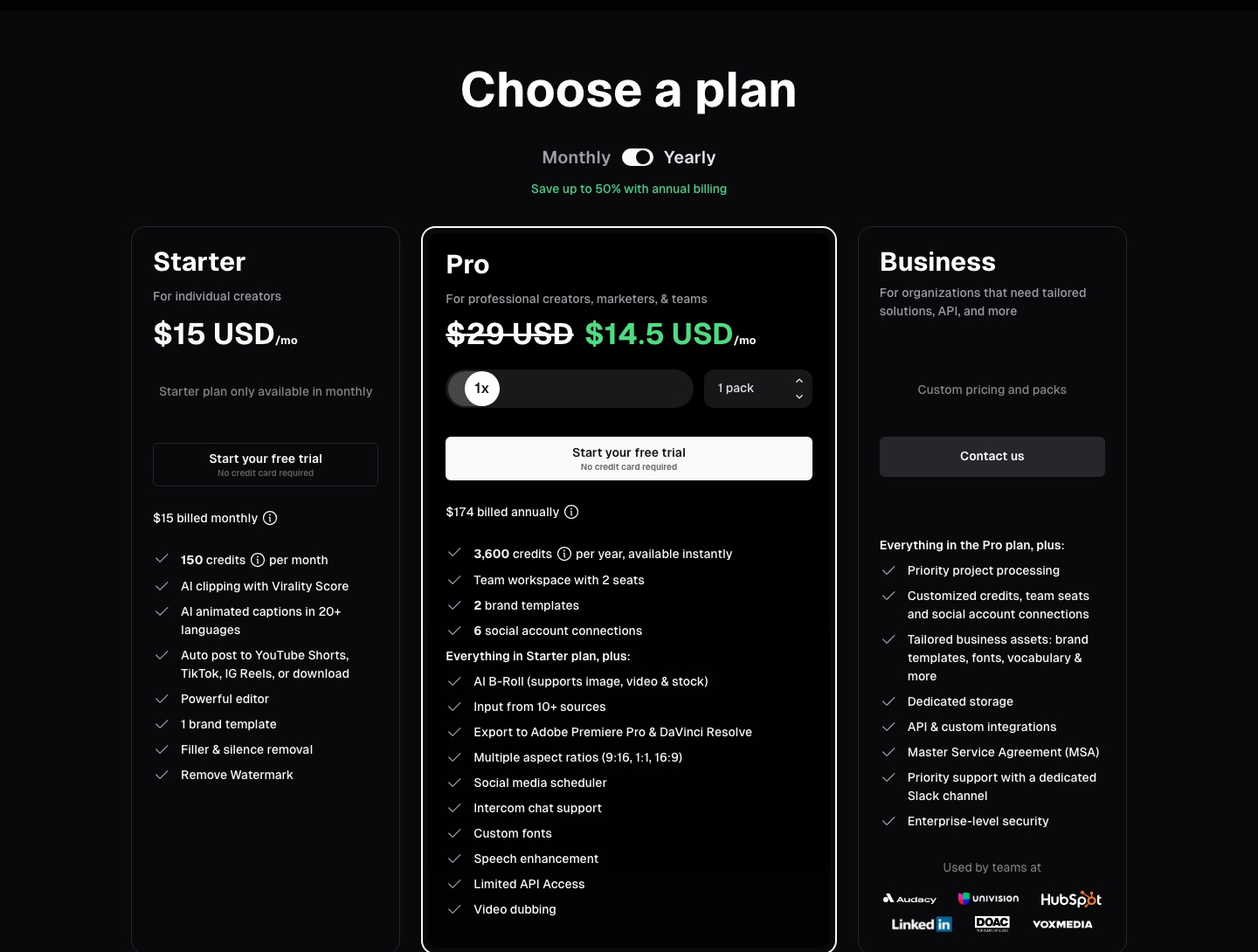 OpusClip pricing with yearly billing selected, captured 16 September 2026. (Source: opus.pro/pricing)
The hidden costs:
- Credits burn on input, not on good output. You pay for minutes processed even when the clips are bad. Independent reviewers estimate 20–40% of clips need editing or get discarded (Ssemble).
- Your time as reviewer. The AI makes the shortlist. A person still has to pick, trim, and fix captions.
- API limits. On Pro/Max the API is capped at 15 hours (900 credits) a month per workspace, with a 10-credit minimum per project and 4 projects running at once (API docs).
⚠️ Billing is where the complaints cluster. The Terms of Service state plainly that fees are not refunded. Reviewers report that projects become inaccessible 3 days after you cancel, even with credits left, and that monthly credits expire after 60 days (eesel AI). On Trustpilot OpusClip sits at 4.0/5 from 492 reviews, with about 20% one-star. Most of those are about processing failures, slow refunds and cancellation friction (Trustpilot).
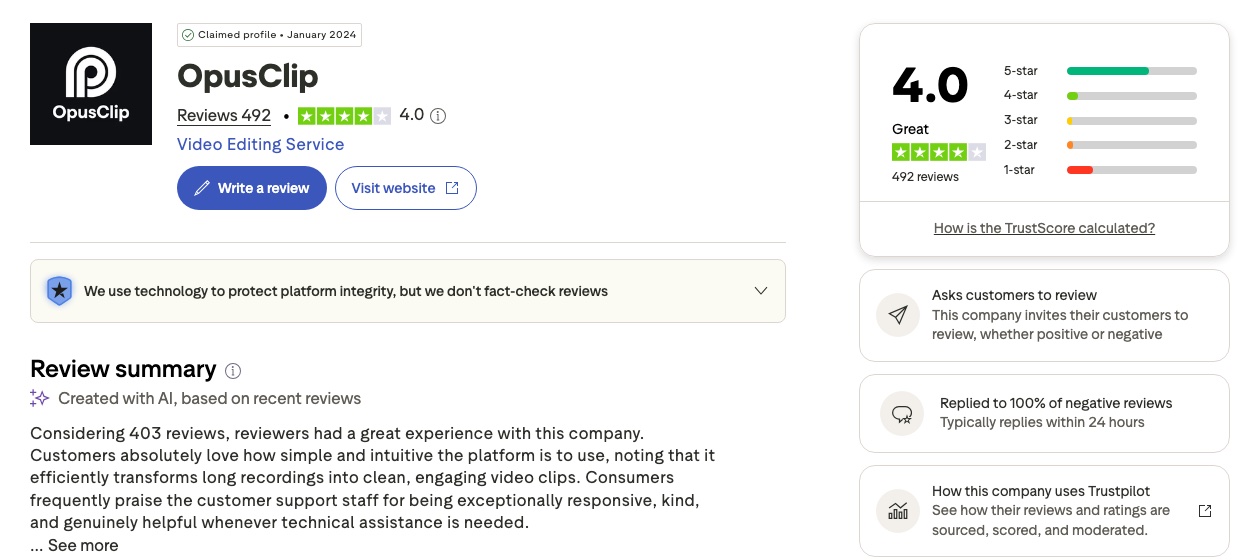 Mostly happy users, but a visible red one-star bar. Read the one-star reviews before you pay yearly. (Source: Trustpilot, 16 September 2026)
⚠️ Privacy check. The privacy policy mentions using personal data for "AI research and model-development activities" and offers an opt-out only to EU/EEA users (Privacy Policy). Footage meant for public posting is fine. Internal meetings, unreleased products or anything under NDA should not go in.
When to use it
- You already produce long talking content. Podcasts, interviews, webinars, livestreams, a founder explaining things to camera. That's what the product is built for.
- You have a person in the loop. An editor or marketer who treats OpusClip's output as a first draft, not the final post.
- You post mostly in English, or you have someone who will proofread captions in your language.
- You're building an automated pipeline. The API and MCP server let an AI agent run clipping as one step in a bigger workflow.
When NOT to use it
- You don't have footage. OpusClip cuts video, it doesn't create it. The hard part is still getting someone on camera. If that's your gap, you need a shoot, not a clipping tool.
- Your content is visual rather than verbal. Food, interiors, products, cinematic brand films. Reviewers note inconsistent results on cinematic or heavily branded content (NextClip). A human editor wins here.
- You need captions in Vietnamese (or another non-English language) with no one checking them. Vietnamese is supported, but a Vietnamese AI community guide warns the AI still favours English and captions need review (Cộng đồng AI VN). One wrong diacritic on a brand post looks careless.
- You run many brands from one account. Pro allows 2–4 brand templates and 6 social connections. Agencies hit that ceiling fast, and Business pricing isn't published.
- You expect it to replace marketing. It won't plan content, run ads, answer comments or read the analytics. It removes one bottleneck, not the job.
OpusClip vs the alternatives
| OpusClip | A human editor | Do nothing | |
|---|---|---|---|
| Finding the good moments | Minutes, hit-or-miss | Hours, reliable | — |
| Cost | $15–29 USD / month + review time | Hourly or per-video rate | $0 |
| Brand and visual quality | Template-level | As good as the editor | — |
| Non-English captions | Needs proofreading | Native if the editor is | — |
| Scales to many videos | Yes, until credit and API caps | Only with more people | — |
| Risk | Billing friction, wasted credits | Hiring and turnaround | Footage wasted, competitors post instead |
In practice the best setup is usually both: OpusClip does the first cut, and a human decides what ships.
📺 I Tried the New OpusClip AI Producer So You Don't Have To — Stephen W. Thomas (an independent test, not a vendor demo)
The verdict
- Adopt it if you sit on hours of talking footage and have someone to review the output. Start on monthly Pro ($29), test it on 3 real videos, and time how long editing takes before and after.
- Only switch to yearly ($174) once the numbers hold up. There are no refunds, so set a reminder before renewal.
- Skip it if your real problem is getting on camera at all, if your content is mostly visual, or if you publish in a language nobody on your team will proofread.
FAQ
Is the free plan enough to decide? It's enough to see clip selection quality, but it has a watermark, no editing, and clips expire after 3 days. Use it to test, not to publish.
How much video does $29 a month actually cover? Credits equal source minutes. Annual Pro gives 3,600 credits a year, about 300 minutes a month. That's roughly ten 30-minute interviews.
Does it work for Vietnamese content? Vietnamese is on the supported caption list, but community reports say the output needs proofreading. Budget time for a native speaker to check every clip.
Will it replace my video editor? It replaces the searching, not the judgement. Keep the editor for brand polish, and let OpusClip hand them a shortlist instead of a 45-minute file.
Is it safe to upload client footage? For footage meant to be public, reasonably so. The policy only offers an AI-training opt-out to EU/EEA users, so keep NDA or internal material out.
References
- OpusClip · Pricing · Captions · MCP
- OpusClip API Reference · MCP server setup · opusclip-mcp on GitHub
- What Is an AI Producer? (OpusClip Blog)
- OpusClip Terms of Service · Privacy Policy
- Trustpilot: OpusClip
- eesel AI: OpusClip pricing in 2026
- Ssemble: Opus Clip Review 2026
- NextClip: OpusClip Review
- checkthat.ai: OpusClip reviews
- Cộng đồng AI Việt Nam: Hướng dẫn OpusClip
- Video: Stephen W. Thomas on YouTube
#OpusClip #AIVideo #ShortFormVideo #ContentMarketing #AITools #MCP
✍️ The Author: Do Ngoc Hoan Founder of CookConnects.ca & Wizy.ca. Bridging the gap between advanced algorithms and business execution. I write for technical founders looking to scale their impact with AI and robust engineering.