Search Console vs GA4: Same Site, 30% Different Numbers — And Both Are Right
Search Console says 600 clicks. GA4 says 400 sessions. Neither is broken. Here is which tool answers which question — and when you need neither.
Google Search Console tells you how people find your site; GA4 tells you what they do once they arrive. They will never report the same traffic number — a 20–30% gap is normal, and on many sites in 2026 it is closer to 50%. Neither tool is broken. If you only have time for one, pick the one that answers the question you are actually asking.
The problem: two dashboards, two different truths
You open Search Console. It says 600 clicks last month.
You open GA4. It says 400 organic sessions.
Same site. Same month. A 200-visit hole. So you spend an afternoon hunting for the bug — a broken tag, a misconfigured property, a filter someone left on. You find nothing, because there is nothing to find.
This is the single most common way people waste time with Google's free analytics tools: they treat two instruments that measure different things in different places as if they were two thermometers that should agree.
They aren't. Here is the useful way to think about it.
Search Console stands outside the restaurant, watching who walks past, which sign catches their eye, and who steps through the door. GA4 stands inside, watching what people order, how long they stay, and whether they come back.
Neither one can do the other's job. And that's the point.
📺 Intro to Google Search Console — Google Search Central (the official 5-minute overview, if you have never opened it)
What Search Console actually is, in plain English
Search Console is Google reporting on itself. It reads from Google's own search logs — the servers that decide what to show when someone types a query. That's why it doesn't need any code on your website to work.
It answers exactly one family of question: how does Google see my site, and what happens in the search results before anyone reaches me?
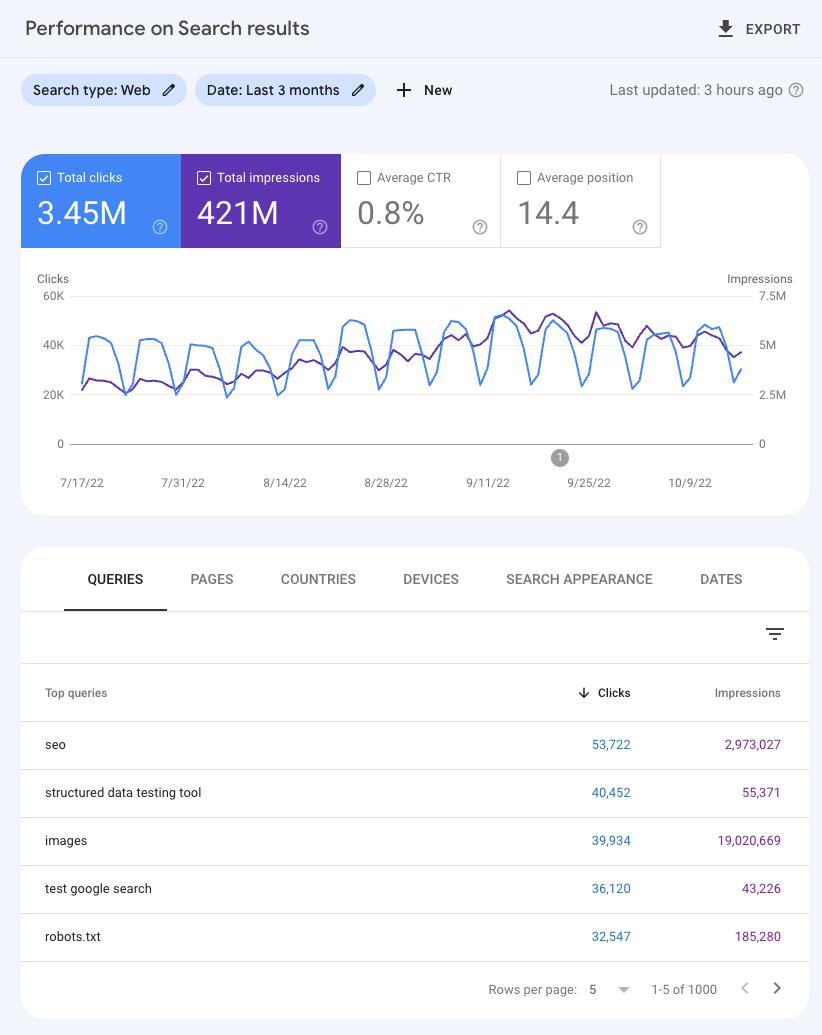 The four numbers Search Console lives on — clicks, impressions, CTR, average position — plus the exact search terms behind them. Note "1–5 of 1000" at the bottom: that row cap matters later. (Source: Google Search Central)
Four terms carry almost the whole tool, so let's define them once:
- Impressions — your page appeared in someone's search results. They may not have looked at it.
- Clicks — someone actually clicked through to you.
- CTR (click-through rate) — clicks ÷ impressions. The percentage of people who saw you and chose you.
- Average position — roughly where you sit on the results page. Lower is better; 1 is the top.
The consequence: Search Console is the only free tool that tells you the actual words people typed. That's not a nice-to-have. It's the difference between guessing what your audience wants and reading it off a screen.
What GA4 actually is
GA4 works the opposite way. It's a small piece of JavaScript that runs in the visitor's browser, on your pages. Nothing loads, nothing gets recorded.
Because it lives on your site rather than inside Google Search, it sees every visitor — from Google, Facebook, an email newsletter, a podcast mention, a direct bookmark, an ad. And it follows them: which pages, how long, what they clicked, whether they signed up or paid.
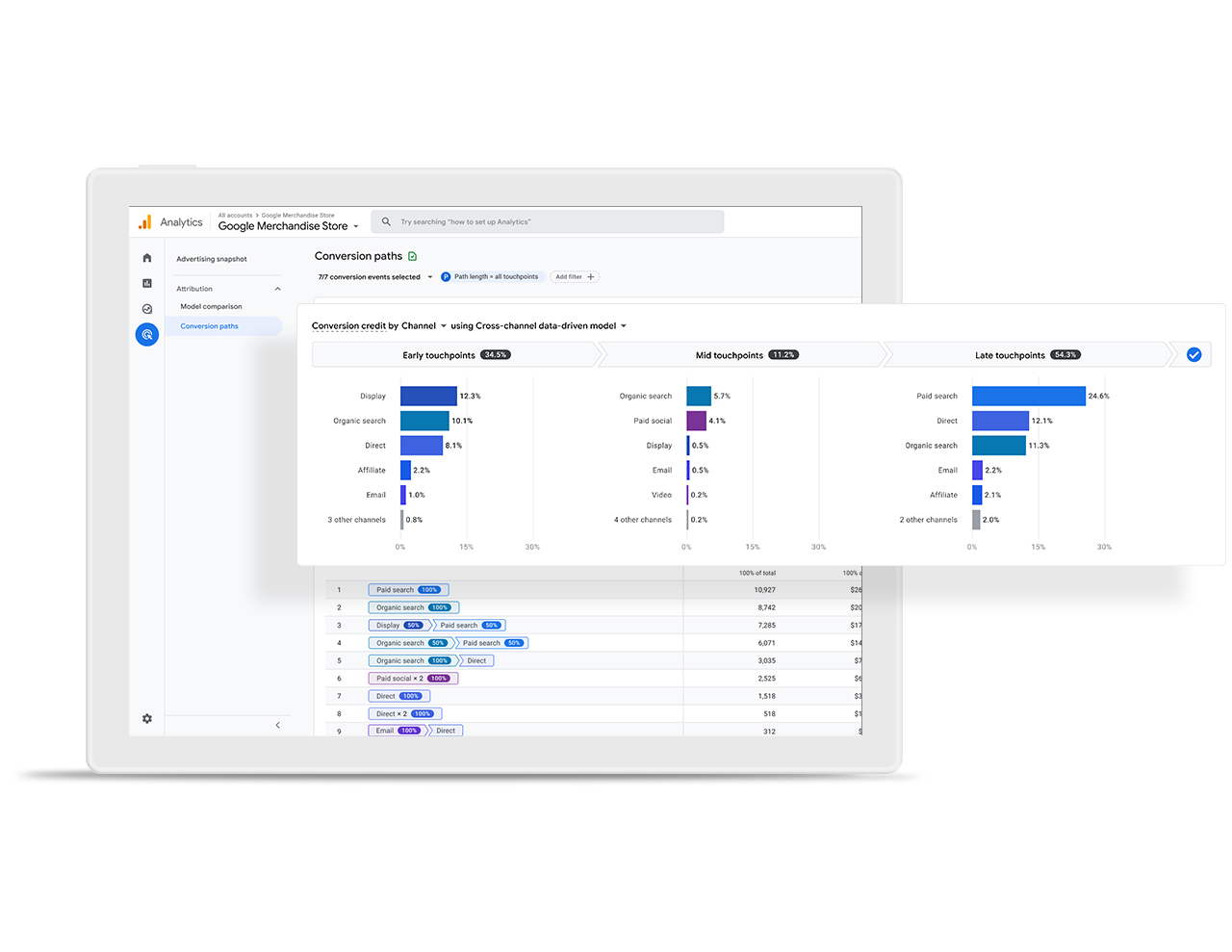 What GA4 can do that Search Console structurally cannot: credit a conversion across every channel that touched it. Organic search is one bar among many here. (Source: Google Analytics)
So GA4 answers a completely different family of question: once someone is on my site, do they care, and do they buy?
Why the numbers never match — and why that's fine
The gap is structural, not a defect. Four honest reasons:
1. Server-side vs browser-side. Search Console records the click the moment Google serves it. GA4 records the visit only if your page loads and its script fires. Someone who taps your result and hits "back" after half a second is 1 click in Search Console and 0 sessions in GA4.
2. Cookie consent. If a visitor declines your cookie banner, GA4 may record nothing at all. Google's search log still counted the click. With Consent Mode v2 enforcement and ad blockers now mainstream, this alone has pushed some sites past a 50% gap.
3. Counting units. One person clicking your result, leaving, and clicking it again an hour later is 2 clicks in Search Console but often 1 user and 1–2 sessions in GA4. Different nouns, different totals.
4. Bot filtering. The two systems use different rules for what counts as a human.
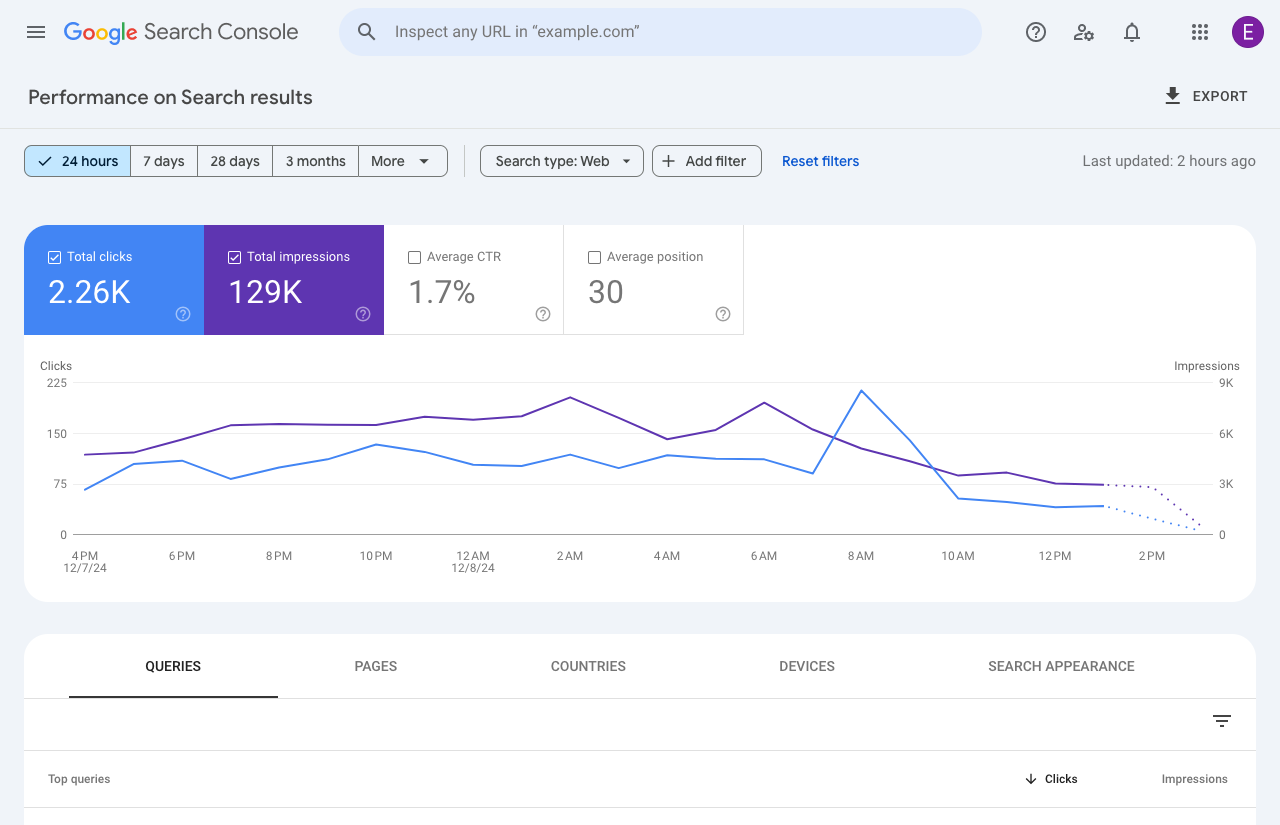 Search Console's 24-hour view updates within hours; GA4 reports in near real time. Even the clocks don't line up. (Source: Google Search Central)
⚠️ The practical rule: never mix the two numbers in one sentence. Report SEO performance from Search Console, report business performance from GA4, and stop trying to reconcile them. A "reconciliation project" is the most expensive way to learn that both tools were right.
The one thing only Search Console can see in 2026
This is the newest and most under-appreciated reason to have Search Console open.
On 3 June 2026, Google launched dedicated Generative AI performance reports in Search Console — separate views showing how often your pages appear inside AI Overviews and AI Mode, in both Search and Discover. It's rolling out to a subset of sites first.
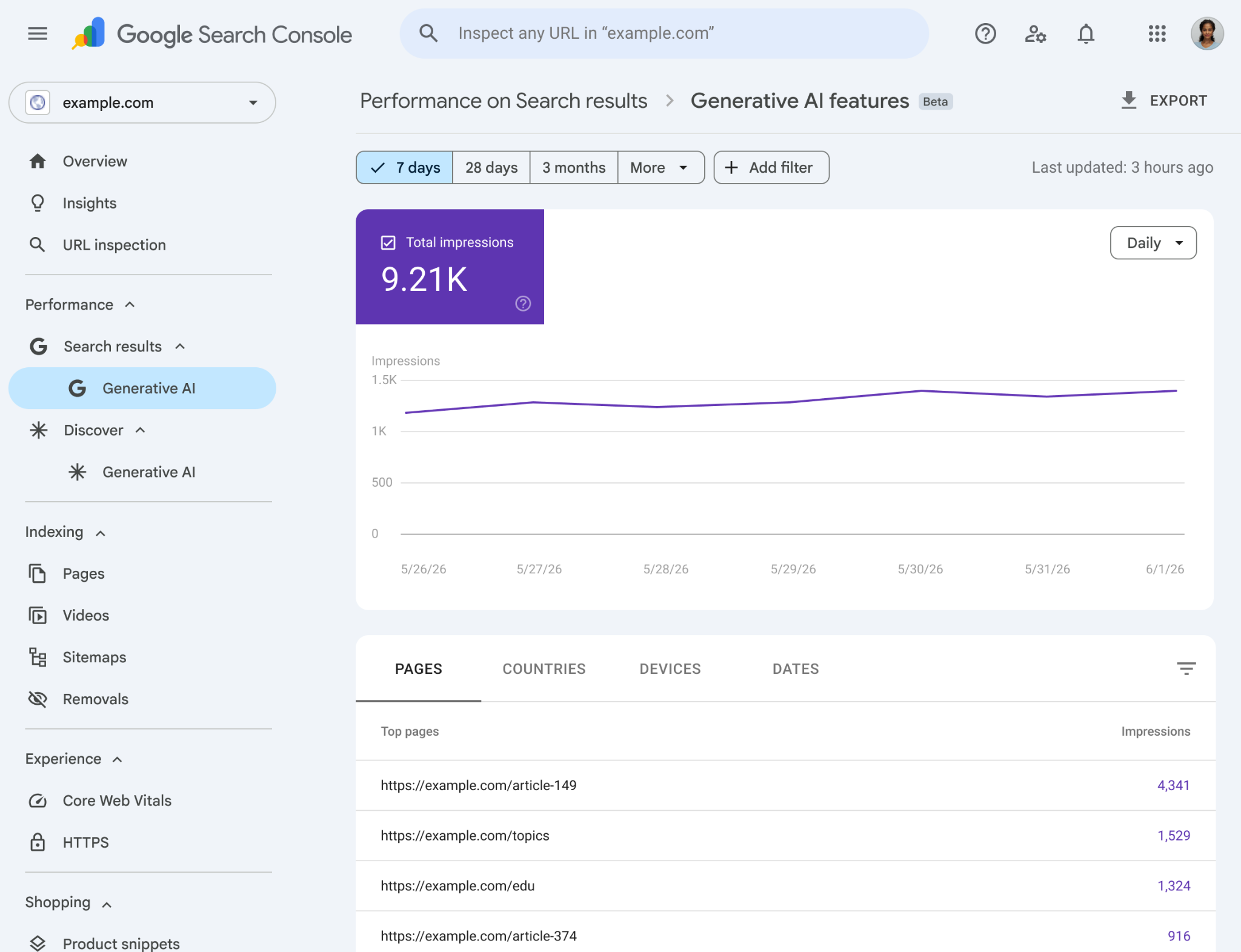 The Generative AI features report: impressions, pages, countries, devices, dates — and notably no clicks column. AI answers often don't send a click at all. (Source: Google Search Central)
Why this matters more than it looks: when an AI answer satisfies the user without a click, GA4 sees absolutely nothing. No session, no event, no trace. Your brand was shown to thousands of people and your analytics dashboard stayed flat.
Search Console is currently the only free place that number exists.
What it costs you — and the limits nobody mentions
Setup is genuinely cheap. Verifying a domain in Search Console is a single DNS record and takes about ten minutes; linking it to GA4 is three clicks in Admin → Search Console links. There is no price tag on either tool.
The real cost is the ceilings you'll hit later:
| Limit | Search Console | GA4 (free tier) |
|---|---|---|
| History kept | 16 months, then permanently deleted | 2 months by default, 14 months maximum |
| Rows you can see | 1,000 in the interface (25,000 per API request) | Much higher, but sampled on large explorations |
| Data freshness | 1–3 day lag on most reports | Near real time |
| Non-Google traffic | None at all | Everything |
| Keyword data | Exact queries | Mostly hidden as (not provided) |
⚠️ Fix the retention setting today. A new GA4 property defaults to 2 months of event-level data. If nobody changes it, your year-over-year comparison next January simply won't exist — and it cannot be recovered retroactively. Set it to 14 months in Admin → Data Settings → Data Retention, now.
⚠️ 16 months is a hard wall in Search Console. Older data is deleted, not archived. If you need multi-year SEO history, the BigQuery bulk export is the only mechanism that preserves it — and that one does have a cloud storage bill attached.
When to open Search Console
- A page is stuck on page two. Filter for queries where you rank 6–15 with high impressions and a low CTR. That's the shortest path to more traffic you already almost earned.
- Traffic dropped and you don't know why. Indexing errors, manual actions, and ranking slides only show up here.
- You're planning content. Real queries beat any keyword tool's estimates, because they're your actual audience.
- You want to know if AI search is showing your brand. As of mid-2026, this is the only free source.
When to open GA4
- You're deciding where to spend money. GA4 is the only one that can compare organic against paid, email and social side by side.
- Traffic is up but revenue isn't. That's a post-click problem, and Search Console cannot see it.
- You want to know if content actually gets read. Average engagement time tells you whether that 2,000-word guide holds anyone.
When NOT to bother with either — honestly
- Your site gets under ~100 visits a month. Both dashboards will show statistical noise you'll over-interpret. Go talk to ten customers instead; that's a better use of the same hour.
- You get no traffic from Google Search. If you're an invite-only B2B tool living on outbound and referrals, Search Console will show you an empty room. Skip it until SEO is an actual strategy.
- You want to reconcile the two numbers. Not a task. Pick one number per question and move on.
- You need per-person behaviour history. Neither tool is a CRM. Use a CRM.
- Search Console alone as your reporting tool. It has no revenue, no funnel, no non-Google traffic. Clicks are not customers, and a board deck built on clicks will mislead everyone in the room.
Search Console vs GA4 vs doing nothing
| Search Console | GA4 | Stay as you are | |
|---|---|---|---|
| Cost | Free | Free | Free |
| Setup | ~10 min (one DNS record) | ~20 min (tag + retention setting) | 0 |
| Tells you which keywords bring traffic | ✅ Exact | ❌ (not provided) |
❌ |
| Tells you what visitors do on site | ❌ | ✅ | ❌ |
| Sees Facebook / email / ads traffic | ❌ | ✅ | ❌ |
| Sees AI Overviews impressions | ✅ (rolling out) | ❌ | ❌ |
| Warns you about indexing problems | ✅ | ❌ | ❌ |
| Ongoing effort | ~15 min/month | ~30 min/month | 0 |
"Stay as you are" is a defensible choice at very small scale. It stops being defensible the moment you're spending money or time on content and can't tell whether it worked.
💡 The one setup step worth doing: link Search Console into GA4 (Admin → Search Console links). You then get query and landing-page reports from Search Console inside GA4, so the pre-click and post-click story sit in the same interface — no tab-switching, no manual joining.
The verdict
- Run both. They cost nothing and they answer different questions. Only having GA4 means you are guessing at why traffic moves. Only having Search Console means you are guessing at whether traffic is worth anything.
- If you can only run one: selling something → GA4. Building an audience through content → Search Console.
- Do this in the next ten minutes: set GA4 retention to 14 months (the default silently loses your history), then link Search Console to GA4.
- And stop reconciling the numbers. The gap is the design, not the bug.
FAQ
Which number do I report to my boss — 600 clicks or 400 sessions? Sessions from GA4, for anything business-facing, because that's the number that connects to revenue. Use Search Console clicks only when the conversation is specifically about search visibility. Just never put both in the same table.
Is a 30% gap a sign something's broken? No. 20–30% is normal, and above 50% is increasingly common on sites with strict cookie banners or heavy ad-blocker audiences. Investigate only if the gap changes suddenly — that usually means a tag or consent change, not a traffic change.
Do I need this on a two-person team? Search Console, yes — 15 minutes a month for keyword and indexing data you cannot get anywhere else free. GA4, only if you're spending money on traffic or selling online. Otherwise it's a dashboard nobody opens.
What breaks if I skip Search Console entirely? Three things become invisible: the exact search terms bringing you traffic, indexing problems that quietly remove pages from Google, and your visibility inside AI Overviews. You'd only notice any of them months later, via a traffic drop you can't explain.
Can I get more than 1,000 keyword rows? Yes — the Search Analytics API returns up to 25,000 rows per request. But the 16-month retention limit applies to the API too. Only the BigQuery bulk export preserves history beyond that.
References
- Google Search Central — How to use Search Console
- Google Search Central — Introducing Search Generative AI performance reports (June 2026)
- Google Search Central — A deep dive into Search Console performance data filtering and limits
- Google Search Central — An improved way to view your recent performance data
- Google Analytics — official product overview
- Search Console Training — Intro to Google Search Console (video)
#SEO #GoogleSearchConsole #GA4 #Analytics #DigitalMarketing #AEO #ContentStrategy
✍️ The Author: Do Ngoc Hoan Founder of CookConnects.ca & Wizy.ca. Bridging the gap between advanced algorithms and business execution. I write for technical founders looking to scale their impact with AI and robust engineering.